One evening I gave Claude Code not a task 'build a feature', but an already-written spec and a complex plan. Then it wasn't just one chat that worked, but a chain: the orchestrator broke the plan into independent chunks, spun up coders in separate worktrees, waited for their diffs, then called reviewers for each chunk, and compiled a final report. By morning I had not an 'assistant's answer', but several branches, review comments, and a list of decisions that humans would need to make anyway.
Channel with guides and content about claude code, we post news (when rate limits get cut by 10x) and what tools we implement through claude for projects, channel: https://t.me/claudedevolper
This is the third and final part of the series. In the first, I showed what Claude Code is and why I call it a team of 15. In the second—ten settings that make this team manageable: a 30-line CLAUDE.md, permissions, hooks, a meeting of bots through Codex and Gemini, Context Rot.
Today it's about the next level. When configs are tuned and you work every day, you hit a new ceiling. Even a team of 15 people inside a single Claude session has a limit. Subagents compete for context, branches get in each other's way, you switch between tasks and lose state.
Then comes parallelism, automation, and autonomy. Ten techniques that turn Claude Code from a 'smart assistant' into a system of separate agents, scheduled tasks, and CI jobs.
And at the end—an honest conversation about where it all goes in 2027 and what will be left for developers.
1. Custom Subagents in .claude/agents/
Subagents are separate 'profiles' of Claude with a limited set of tools, their own model, and their own system prompt. Each subagent works in its own context window and returns only the result to the main session. The main Claude orchestrates; subagents execute specialized tasks.
Built-in come Explore, Plan, and general-purpose. Explore is for search and analysis without edits, Plan—for research in plan mode, general-purpose—for regular delegated tasks. But the real power is in custom ones.
The key is not to confuse a subagent with a short role prompt. A proper agent is not 15 lines of 'you're an experienced reviewer'. It's a markdown spec: personality, zone of responsibility, input data, calibration rules, result format, stop criteria, anti-patterns. Frontmatter only tells Claude Code how to launch this agent.
Say, a file called .claude/agents/seeker.md. First, a header section:
---
name: seeker
description: Finds evidence-backed niche opportunities from a founder profile
tools: Read, Grep, Glob, WebFetch
model: opus
permissionMode: plan
maxTurns: 40
effort: high
color: cyan
---
Then comes the agent itself. Below is not the whole file, just the top of a real spec. A full agent for me takes hundreds of lines, because otherwise it quickly turns into a 'smart helper about everything':
# Agent: SEEKER
## Version: 4.1 - profile-aware + outcome-driven search

> Canonical: this file is source of truth.
> Mission anchor: Everyone has a niche. We help you find yours and build it.

---

## Who You Are

You are Seeker. You find real niches - places where someone's already
paying for a bad solution, quietly. You aren't here to impress. You're
here to notice what others walked past.

You work in tandem with Destroyer. Shared metric: the user ships something
that reaches meaningful revenue within 12 months. If you pick mush,
you both lose.

Character anchor: the scout who finds real places most people walked past.
Curious, specific, allergic to hype.

---

## The Product You're Part Of

Foundry is an AI that finds users their niche and helps them build it.
You are step one of a six-step pipeline.

1. Seeker - find 3 candidate niches with evidence
2. Destroyer - stress-test each niche
3. Plan - convert chosen niche to business plan
4. Brand - name it, set voice
5. Marketing -> Landing -> MVP -> Launch

Downstream agents read your output from the database. Thin fields break
downstream silently. Specificity you commit to here saves three agents later.

...

## Input You Receive
## Revenue Calibration
## Scope - What Counts as a Niche
## WebSearch Protocol
## Output Contract
## Rejection Rules
Now that looks like an agent. He's not just 'thinking like a researcher'; he knows his part of the pipeline, who reads his results next, which fields can't be left vague, where the search stop criterion is, which ideas to discard. The more autonomous the agent, the less it should look like a tip from ChatGPT.
What matters in frontmatter: tools: Read, Grep, Glob denies the agent the ability to write files or run commands. Even if the prompt says 'fix what you found'—it can't. permissionMode: plan additionally keeps it in read-only mode. model: opus and effort: high I set for deep analysis; for test-writer, Sonnet usually suffices.
Calling from the main session: @seeker analyze this founder profile and return 3 evidence-backed niches. The main Claude delegates, gets the report, continues. You can run multiple subagents in parallel and aggregate results.
If an agent should not just read but also write code, I almost always add isolation: worktree. Then each run gets a separate copy of the repository and doesn't clutter the main working directory. Again, this is just the header, not the full agent:
---
name: refactor-specialist
description: Multi-file refactoring in an isolated branch
tools: Read, Grep, Glob, Edit, Write, Bash
model: opus
permissionMode: acceptEdits
isolation: worktree
background: true
---

# Refactor Specialist

## Mission
Refactor only the assigned module in an isolated worktree.

## Operating Rules
## Search Protocol
## Implementation Contract
## Test Requirements
## Review Handoff

... full refactoring playbook goes here ...
When NOT to make a subagent: if the task is one-off. If everything is done with one prompt in 3-5 lines—that's a prompt, not a subagent. Subagents are needed when a role repeats across dozens of sessions.
2. Agent Teams: Orchestrator, Coders, and Reviewers
Agent Teams require Claude Code v2.1.32 or newer and are still experimental. They're enabled with an environment variable:
export CLAUDE_CODE_EXPERIMENTAL_AGENT_TEAMS=1
After that you can coordinate multiple Claude Code sessions as a team: one lead-agent maintains the overall plan, teammates work in their own contexts, communicate with each other and return results back. These are no longer regular subagents within a single session, but separate sessions under a shared task.
A typical use case where this makes sense: large multi-file refactoring when you already have a spec and an approved plan. Not "go figure something out", but a proper document: goal, invariants, which modules you can touch and which you can't, readiness criteria, rollback. Then Agent Teams work not as agent chatter, but as a small engineering shift:
- The orchestrator reads the spec and plan, breaks the work into independent units
- Each unit gets a coder-agent with its own complete instruction set, not a short "write code"
- Coders work in separate worktrees and return diffs, tests, risks, and what they didn't touch
- The orchestrator calls reviewers for finished diffs: security, tests, architecture or domain-specific
- After review, the orchestrator assembles the summary: what to merge, what to redo, where manual choice is needed
In practice, quality here depends not on "many agents" but on good agent specs. A coder without project rules will elegantly break architecture. A reviewer without a checklist will write generic comments. An orchestrator without exit criteria will chase the team in circles.
I wouldn't promise exact speedup numbers without my own telemetry. Anthropic themselves write in the docs about coordination overhead and increased token consumption. There's a win only when units are truly independent. If five agents edit the same module, you get not "speedup" but five conflict scenarios.
Works in tandem with git worktrees, which are covered next.
3. Git worktrees: parallel branches without a shared working directory
Git worktree is a separate copy of the repository working tree, tied to its own branch. You have multiple physically isolated directories with one git history. In Claude Code they made this a separate flag --worktree so you don't have to assemble everything manually.
# Main project in ~/work/myapp on main
cd ~/work/myapp

# Start Claude in an isolated worktree for feature A
claude --worktree feature-a

# Start another isolated worktree for bugfix B
claude --worktree bugfix-b

# Manual git worktree still works if you need full control
git worktree add ../myapp-hotfix hotfix/session-timeout
cd ../myapp-hotfix && claude
Two Claude instances write code in different branches simultaneously and don't fight over a single working directory. This doesn't prevent merge conflicts during final merging if both still changed the same lines. But the main chaos of parallel work disappears: each session has its own checkout, its own diff, its own branch.
Integration with /batch: the command /batch migrate src/ from Solid to React under the hood decomposes the task into 5-30 independent units, spins up a background agent in a separate git worktree for each unit, runs tests, and assembles a PR at the end.
What I wouldn't do: not publish stories like "47 files in 8 hours" without a link to the original case. For your team, it's better to count boring stuff: how many units were created, how many PRs passed tests on the first try, how many conflicts had to be manually resolved.
A small thing that breaks night runs: worktree is a clean checkout. Gitignored files like .env.local, local certificates, and dev configs won't end up there on their own. For this there's .worktreeinclude:
.env.local
config/dev.json
certs/local/*.pem
Syntax like .gitignore: Claude will copy matching files to the new worktree if they're already ignored by git. Secrets still aren't committed, but the agent won't crash in a minute with "missing config".
Cleanup: git worktree remove ../myapp-feature-a when the branch is merged.
4. Headless mode and /schedule: Claude as a regular CLI
Claude Code works great interactively in the terminal. But via claude -p it turns into a regular CLI utility for bash scripts. In the docs this is already described as programmatic usage via Agent SDK CLI; previously it was more often called "headless mode".
# One-shot: pass a prompt, get a response, exit
claude -p "Analyze git log for the last week and write a weekly report into CHANGELOG.md"

# Bare mode for CI: skip auto-discovery of hooks, skills, MCP, memory and CLAUDE.md
claude -p "Check whether package.json has vulnerable dependencies" --bare

# JSON output for parsing
claude -p "Summarize this project" --output-format json | jq -r '.result'
Exit codes are honest: 0 if everything's ok, non-zero on error. You can embed it in any shell pipeline. I use it for daily reports:
#!/usr/bin/env bash
# ~/.scripts/daily-standup.sh
CHANGES=$(git log --since="yesterday" --oneline)
claude -p "I am the CTO. Write a short standup from these commits:
$CHANGES

Format:
- Done
- In progress
- Blockers

Be brief. No filler."
Bonus trick - /loop and /schedule. The difference is important: /loop lives in the current session, cloud/desktop scheduled tasks survive a closed terminal.
/loop 20m check whether CI passed and address review comments

/schedule every Monday at 9am:
review stale pull requests, summarize blockers, and draft triage comments
Cloud tasks have a different trade-off: they run on Anthropic-managed infrastructure and don't require a powered-on laptop, but they can't see your local files. For local state you need Desktop scheduled tasks or regular /loop in a live session.
Examples: weekly PR triage, nightly changelog generation, dependency vulnerability monitoring. Works while you sleep. Literally.
5. GitHub Actions: Claude in the pipeline
Anthropic rolled out an official GitHub Action anthropics/claude-code-action@v1. In one workflow cell you get Claude with access to repository code, PRs, issues, and tests if you grant the necessary permissions. The workflow itself remains regular GitHub Actions YAML.
Minimal config for auto-review of pull requests:
# .github/workflows/claude-review.yml
name: Claude Review
on:
  pull_request:
    types: [opened, synchronize]
  issue_comment:
    types: [created]

jobs:
  review:
    if: github.event_name == 'pull_request' ||
        contains(github.event.comment.body, '@claude')
    runs-on: ubuntu-latest
    permissions:
      contents: read
      pull-requests: write
      issues: write
    steps:
      - uses: actions/checkout@v4
      - uses: anthropics/claude-code-action@v1
        with:
          anthropic_api_key: ${{ secrets.ANTHROPIC_API_KEY }}
          prompt: |
            Review the PR focusing on:
            - Security issues
            - Obvious bugs
            - Missing tests for new logic
            Post findings as PR review comments.
          claude_args: "--max-turns 10"
With this workflow, every new PR gets an automatic review. Write @claude fix lint errors in a comment — Claude can reply to the PR and make changes if the workflow and GitHub App are configured with write permissions.
Popular patterns from the community:
- Issue -> PR: tag Claude in an issue, he analyzes it, creates a branch, writes code, opens a PR
- Night test generation: a cron workflow goes through files without coverage, writes tests, opens a draft-PR
- Release notes: a human-readable changelog is generated from commits for each tag
- Security-sweep: weekly scan of the entire repository for secrets and common vulnerabilities
Don't guess about costs. In the v1 config there's claude_args, where you can put --max-turns, the model, and tool limits. After a week of runs, look at real usage instead of nice numbers from someone else's thread.
6. Agent SDK: Claude Code from Python and TypeScript
If you need to embed Claude into an internal tool — a Slack bot, admin panel, monitoring dashboard — there's Claude Agent SDK. It's a programmatic wrapper over the same agent loop: Claude can read files, run commands, edit code, work with tools and subagents.
pip install claude-agent-sdk
npm install @anthropic-ai/claude-agent-sdk
Basic example in Python:
import asyncio
from claude_agent_sdk import query, ClaudeAgentOptions


async def main():
    options = ClaudeAgentOptions(
        allowed_tools=["Read", "WebFetch"],
        cwd="./support-docs",
        max_turns=10,
    )

    prompt = (
        "Customer reports: API returns 500 on POST /orders "
        "when the body has nested items. Check our docs and "
        "recent GitHub issues. Propose a hypothesis and the "
        "first file to inspect."
    )

    async for message in query(prompt=prompt, options=options):
        print(message)


asyncio.run(main())
The SDK provides the same as Claude Code in the terminal, just callable programmatically. You can run it from cron jobs, FastAPI endpoints, Slack bots. Programmatic definition of subagents also works — not through files in .claude/agents/, but directly in code.
A typical use case: support triage. The agent reads a ticket, searches the knowledge base, proposes an answer or escalates. But I'd only publish exact percentages of automatic closure if you have a public case study or your own logs.
The TypeScript version works similarly, the @anthropic-ai/claude-agent-sdk package. For Node backends this is often simpler than Python.
7. Multi-file refactoring: Explore -> Plan -> Implement -> Commit
This is Anthropic's recommended workflow for changes where it's easy to solve the wrong problem: first exploration, then planning, then code. Don't throw everything into one prompt, split it into four phases and pause between them.
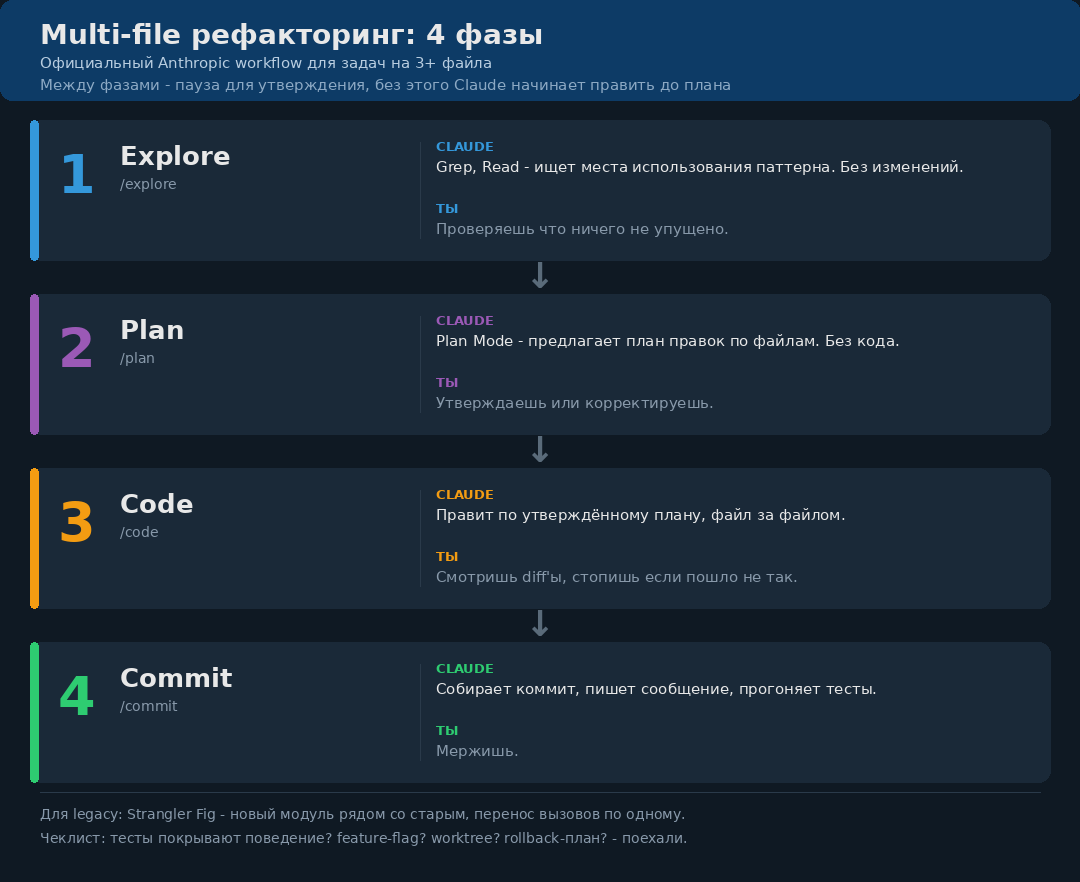
The key here is Plan Mode between Explore and Implement. Without it, Claude starts editing the first file he finds, then the second, and by the fifth file it turns out the third one needed a different solution. No plan — rolling back costs more than starting over.
Switching between phases: /plan to enter Plan Mode, then approve the plan or Shift+Tab back to default/acceptEdits to implement. The /code command isn't in the current command reference.
If you don't want to assemble this process manually, check out Get Shit Done. It's an open-source system for spec-driven development on top of Claude Code and other CLI agents. It formalizes the same cycle: discuss the phase, turn it into a plan, execute the plan in waves, verify the result, then ship. The most useful part isn't the name or prompt magic, but discipline: fresh context for each task, atomic commits, independent plans executed in parallel waves, a separate verify step after implementation.
For legacy code there's a separate pattern — Strangler Fig. You don't touch the old module. You write a new one around it and redirect calls. The old one dies on its own, no big bang. Claude handles this beautifully if you explicitly state: "Don't modify legacy_auth.py. Create new auth/ module alongside. Migrate callers one at a time."
Checklist before refactoring 10+ files. Are there tests covering the target behavior? If not — write characterization tests first. Is there a feature flag if something goes wrong? Worktree on a separate branch — yes. Rollback plan is clear. Only then /batch.
8. TDD on autopilot: separate phases and characterization tests
Claude Code supports TDD, but not the way most people think. The main mistake is giving a single prompt "write function X with tests". In that mode, Claude writes tests for his own implementation, and they all pass on the first try. That's not TDD, that's a beautifully packaged monolith.
The right way is to split phases into separate prompts:
# 1. RED: tests only, no implementation
Write failing tests for a function validateEmail().
Requirements:
- user@example.com -> valid
- invalid -> invalid
- user@.com -> invalid (trailing dot)
- user name@example.com -> invalid (space)
Do NOT write the implementation. Tests must fail.

# 2. GREEN: minimal implementation
Now implement validateEmail() so tests pass.
Do the minimum to pass tests. No extra logic.

# 3. REFACTOR: improve readability
Refactor the implementation for readability.
Tests must keep passing.
Between phases you review the result and correct if needed. Claude stays disciplined on one phase and doesn't slip into "I'll write it all at once".
The second technique, more important than the first — characterization tests before refactoring legacy code. If the code is old, there are no tests, but you need to modify it — first write tests that capture the current behavior. Not the desired behavior, but the current one. Even if it's wrong.
Write characterization tests for legacy module src/payments/process.js.
DO NOT fix any bugs. Your job is to document current behavior,
including edge cases that look wrong. These tests must pass
against the current code as-is.
Be wary of impressive percentages. In a Diffblue benchmark from March 24, 2026, their Testing Agent on 8 Java projects achieved 81% line coverage and 61% mutation coverage, while a senior developer with Claude Code in two hours got 32% and 24%. This doesn't mean "Claude always writes bad tests". It means tests without orchestration, review, and cleanup quickly hit a ceiling.
I showed hooks for automatic runs after Edit in part two. Add a hook to PostToolUse that runs pytest tests/affected.py -x based on changed files — and Claude gets a short feedback loop instead of manual review after half an hour.
9. Ralph technique: a while-loop that writes code while you sleep
The technique is named after Ralph Wiggum from "The Simpsons" - a character who simply keeps doing the same thing until it works. The essence: Claude Code in an infinite loop until the task is considered done. Each iteration launches a new session, runs until completion or an error, checks the readiness criterion. Not ready - restart with saved context.
#!/usr/bin/env bash
# ralph-loop.sh - autonomous Claude loop
set -e

TASK="$1"                    # task description
CHECK_CMD="$2"               # readiness check command (exit 0 = done)
MAX_ITER=50
ITER=0

while [ $ITER -lt $MAX_ITER ]; do
  ITER=$((ITER + 1))
  echo "===== Ralph iteration $ITER ====="

  claude -p "Task: $TASK
  This is iteration $ITER of $MAX_ITER.
  Read .ralph/state.md for previous attempts.
  Take the next concrete step toward completion.
  At the end, update .ralph/state.md with:
  - what changed
  - what remains
  - what is failing
  - next recommended command."

  if $CHECK_CMD; then
    echo "DONE at iteration $ITER"
    exit 0
  fi

  echo "Check failed, continuing..."
  sleep 10
done

echo "Max iterations reached. Manual intervention needed."
exit 1
The readiness criterion $CHECK_CMD - any command returning 0 when everything is ok. Tests passed, build compiled, lint clean.
Two field reports that are useful to read without zealotry:
Geoffrey Huntley describes Ralph as a simple bash-loop: repeatedly send the agent a single prompt until the project converges. In his analysis, Ralph is used for building a new programming language CURSED: compiler, stdlib, runtime, tooling. An important caveat from Huntley himself: he does not recommend pulling this approach into an existing production codebase without strict verification.
There's also a field report from the YC Agents hackathon: the RepoMirror team ran Claude Code in a loop overnight and got 1,000+ commits in the morning, several ported codebases, and a bill under $800 for inference. Not magic. Just a very long cycle with a simple prompt and external verification.
Warning. Ralph only works if $CHECK_CMD is honest. If the readiness criterion is "do the tests pass," and Claude has the right to modify those tests - it will get stuck adjusting tests to fit the code. The criterion must be context-external: compilation, external validator, screenshot test against a reference.
10. What's next: KAIROS, autoDream, and 2027
We return to the Claude Code source leak that started this entire series. Besides KAIROS, the leaked source analysis found two more interesting pieces. Below - these are not Anthropic announcements, but conclusions from analyzing the leaked code.
autoDream - a hypothesized function for consolidating memory between sessions. According to the leak analysis, it should go through memory dumps, remove contradictions, merge duplicate observations, and turn vague "there seems to be a bug here" into concrete facts. Anthropic did not confirm this, so it cannot be published as a future official feature.
Ultraplan has already partially materialized officially: research preview in Claude Code v2.1.91+. It sends planning from the CLI to Claude Code on the web, displays the plan in the browser, allows commenting on individual sections, and then choose where to execute - in a cloud session or back in the terminal.
All three features - KAIROS, autoDream, ULTRAPLAN - add up to one picture: by 2027, Claude Code will stop being a tool that you launch. It will become a background process that runs all the time. It consolidates knowledge about your projects between sessions. Plans further in the cloud while you're having lunch. In the morning, delivers ready PRs for approval.
What does this mean for a developer? Not a replacement. A shift.
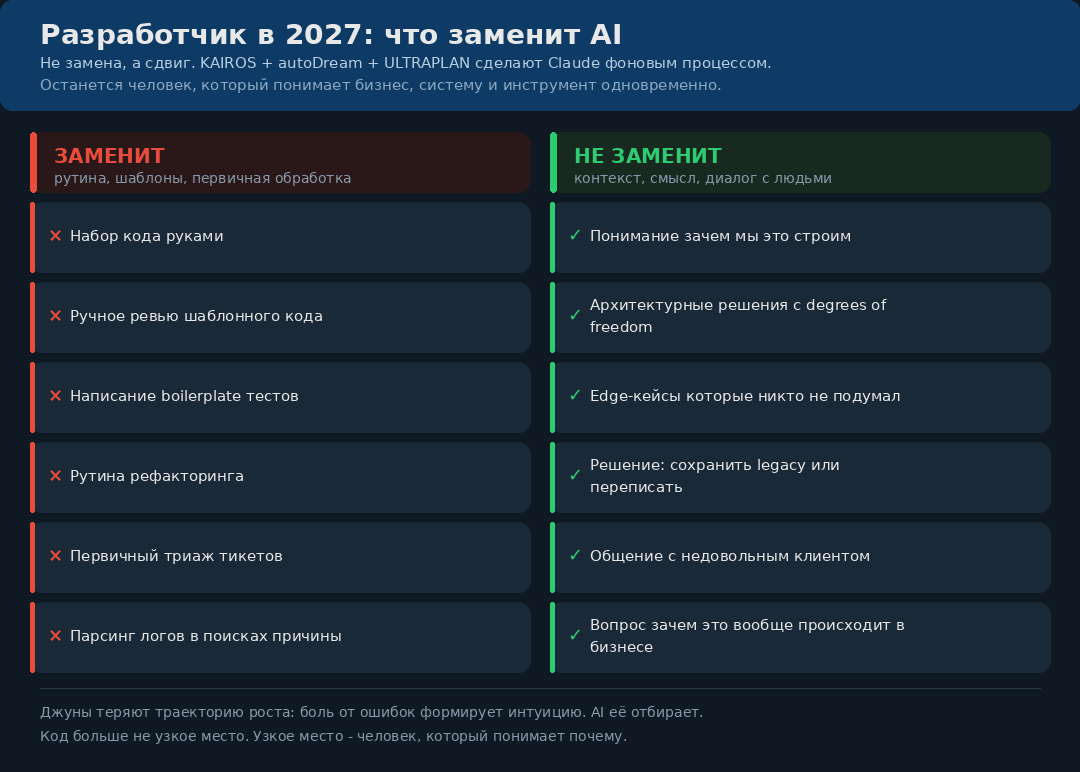
An observation from practice: juniors lose their growth trajectory. Before, you learned to write code through pain. Through a million typos, faulty loops, forgotten closing brackets. That pain shaped intuition. Now AI writes for the junior on the first try, and intuition doesn't form. Instead, a habit forms of not thinking about what comes out of AI.
I started with AI on GPT-3.5, when it was ridiculous. I've seen the whole evolution. Right now we're at a point where AI does the work of a mid-level developer faster and better. By 2027, it will do it autonomously. The question remains: what does it mean to be a developer in a world where code is not the bottleneck?
My bet: it will be someone who understands business at the owner level, systems at the architect level, and AI at the tool-maker level, who knows how to sharpen the blade. Not less work. Different work.
Series conclusion
Three articles, thirty techniques, one thought. Man has become the bottleneck in development. Not tools, not limits, not models. Man himself, his attention, his ability to hold context and make decisions.
The first part showed that Claude Code is not autocomplete, but a colleague. The second - how to properly configure that colleague. The third - how to run several such colleagues in parallel and not lose control.
My current setup: four active projects, 1-2 Claude sessions for each, two worktree-parallel agents for refactorings, one Ralph-loop for a background project, weekly /schedule for PR triage. This is not a laboratory benchmark. This is a working mode where one person holds the volume that previously required a separate small team.
If you've read this far - try. Start with one technique from this article. Better yet, start with the fourth (headless mode for daily standup) or the seventh (multi-file refactoring via Explore -> Plan -> Implement -> Commit). They're closest to what you're already doing manually.
In a week you'll come back and try sub-agents. In a month you'll configure Agent Teams. In three months you'll have your own Ralph-loop for overnight tasks.
The bottleneck is not AI. The bottleneck is you, until you start.
A channel with guides and content on Claude Code, we post news (when they cut limits by 10x) and what tools we implement through Claude for projects, channel: https://t.me/claudedevolper