Claude Code in Simple Terms
Claude Code is an intelligent tool for programming work built on Anthropic's Claude AI. Simply put, it acts as a developer's assistant: it helps write code, find and fix errors, understand other people's projects, and take on routine tasks.
Even those unfamiliar with programming can easily imagine how it works. It's like a very experienced colleague who doesn't get tired, quickly navigates through thousands of lines of code, and knows how to explain complex things in simple, understandable language. Sometimes it's even more helpful than a developer who answers every question with: "That's obvious."
This material covers:
- what Claude Code is in simple terms;
- why you need it;
- what tasks it can solve in practice;
- who it will be useful for;
- how it differs from standard chatbots;
- whether it has limitations.
What Claude Code is in Simple Terms
Claude Code is an AI tool for programming work that helps you interact with code not just through a "question and answer" format, but in a more practical mode.
In other words, it's no longer just a chat where you can write: "Generate a function in Python." Claude Code can do much more:
- analyze project structure;
- find errors and weak points;
- suggest fixes;
- generate new code snippets;
- explain how a program works;
- help with testing and documentation;
- speed up routine task completion.
To put it simply, Claude Code is a developer's assistant that "understands" code and helps work with it efficiently.
Why You Need Claude Code
Modern development is far more than just writing code from scratch. More often, programmers face other tasks:

- understanding other people's projects;
- finding and fixing errors;
- making targeted changes in large codebases;
- writing and maintaining tests;
- updating documentation;
- renaming functions without risking breaking anything;
- trying to understand your own code after some time.
In these situations, Claude Code becomes especially useful.
It helps:
1. Save Time
Tasks that used to take an hour can now be completed much faster.
2. Reduce Routine
Repetitive and similar operations can be delegated to the tool.
3. Understand Code Faster
Especially relevant when working with other people's projects or old code.
4. Learn and Develop
Claude Code explains code logic, error causes, and how to fix them, helping you better understand programming.
What Claude Code Can Do
1. Code Generation from Description
You can describe a task in plain language, and Claude Code will offer a solution.
For example:
"Create a registration form in React with email and password validation."
The tool will help you quickly sketch out the functional foundation. This is especially convenient for starting a project, creating a prototype, or when you don't want to write everything manually.
2. Analyzing Other People's Code
One of the most valuable features is explaining existing code.
If you're facing a file with hundreds of lines that's hard to understand, you can ask Claude Code:
- explain what a specific function does;
- show how project parts are connected;
- point out where the main logic begins;
- hint at why an error occurs.
This is useful for beginners, developers new to a project, and even business owners who want to better understand the product.
3. Finding and Fixing Errors
Claude Code helps with debugging.
You just need to provide:
- the error message;
- the problematic code snippet;
- the expected result.
After that, it can:
- suggest the cause of the failure;
- point out the vulnerable spot;
- offer a fix;
- explain what went wrong.
It doesn't replace an experienced developer, but in many cases, it significantly speeds up finding a solution.
4. Code Refactoring
Refactoring is improving code structure without changing its behavior.
Claude Code helps make code:
- cleaner;
- clearer;
- more compact;
- easier to maintain.
It can:
- split a large function into several;
- rename variables;
- remove duplication;
- suggest a more logical architecture.
Essentially, it's a "general cleanup" of the code.
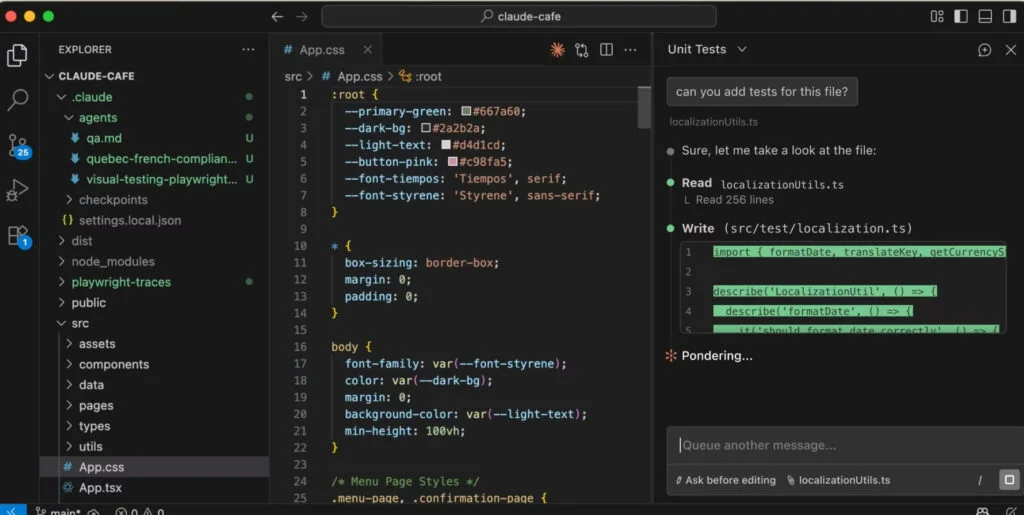
5. Writing Tests
Tests ensure that a program works correctly.
Claude Code can:
- generate unit-tests;
- suggest test scenarios;
- find uncovered areas;
- explain what's important to test.
This reduces the risk of errors after changes and makes the product more stable.
6. Working with Documentation
Documentation is often postponed, but without it, it's hard to develop a project.
Claude Code helps:
- describe modules and functions;
- document APIs;
- add comments;
- create README files;
- briefly summarize system logic.
This is convenient for both teams and individual developers.
7. Working with Large Projects
Unlike regular chatbots, Claude Code handles large codebases better.
It can:
- analyze multiple files at once;
- account for relationships between modules;
- help find the right parts of the project;
- support changes more meaningfully.
Therefore, it's useful for both beginners and experienced developers.
8. Automating Routine Tasks
Development includes many repetitive actions:
- making similar changes;
- updating project structure;
- bringing to a single style;
- creating templates;
- migrating old code.
Claude Code helps speed up these processes and reduce developer workload.
As a result, there's more time for truly important tasks—architecture, logic, and product development.
How Claude Code Differs from Regular AI Chat
It might seem that a regular AI chat would suffice. To some extent, that's true, but Claude Code is a more specialized tool.
Regular AI chat:
- answers questions;
- provides examples;
- explains theory;
- helps with specific issues.
Claude Code:
- works deeper with codebases;
- considers project context;
- helps with real development tasks;
- supports code, not just generates it.
To put it simply: regular chat is a consultant, while Claude Code is a full-fledged code assistant.
Who Claude Code Is For
Beginners
If you're just starting to learn programming, Claude Code will be a convenient assistant: it explains complex topics in simple language, shows examples, and helps you grasp the basics faster.
Experienced Developers
For professionals, it's useful as a tool to speed up work: it helps handle routine tasks, find errors, and work more efficiently with large projects.
Development Teams
In teams, Claude Code can act as an additional resource that increases task completion speed and simplifies interaction with the codebase.
Freelancers
For those working independently, it's a way to complete tasks faster: from writing code to edits, testing, and preparing documentation.
Business Owners and Managers
Even without programming skills, it's important to understand that such tools allow teams to work faster, reduce costs, and accelerate product release.
Can Claude Code Replace a Programmer?
Short answer: no.
Claude Code is a powerful tool, but it's not a complete replacement for a developer. It doesn't make independent decisions, isn't responsible for the product, and doesn't understand business tasks as deeply as a human does.
However, it complements a programmer's work well:
- takes on routine tasks;
- helps find solutions faster;
- reduces errors;
- speeds up development.
The conclusion is simple: Claude Code doesn't replace a developer, it makes them more productive.

Yes, Claude Code's capabilities are impressive, but it has some important limitations:
- it can make mistakes;
- sometimes it suggests suboptimal solutions;
- doesn't always consider business context;
- isn't responsible for the final result;
- doesn't replace a developer's experience and architectural thinking.
Therefore, it's more accurate to view Claude Code not as an alternative to a programmer, but as an intelligent assistant.
It's like a calculator: it speeds up calculations, but doesn't make decisions for a person. Though sometimes, of course, we wish it did.
Claude Code Advantages
Here's what makes this tool particularly valuable:
Speed
Allows you to write, check, and improve code faster.
Clear Explanations
It can translate complex technical concepts into simple language.
Resource Saving
Reduces routine workload and lets you focus on more important tasks.
Learning Support
Helps you learn programming faster through explanations and examples.
Working with Large Projects
Effective where there are many files, logic, and interconnections.
Claude Code Limitations
To complete the picture, it's important to consider the downsides:
1. Errors Are Possible
Sometimes solutions look correct, but in practice, they don't work as expected.
2. Verification Is Required
Code can't be blindly pushed to production—developer oversight is necessary.
3. Limited Business Understanding
The tool might suggest a technically correct solution that doesn't match company objectives.
4. Security Concerns
When working with sensitive data, it's important to consider the policy for using AI tools.
How Claude Code Helps in Practice
A few real-life examples:
Example 1. A Beginner Learning Python
An error occurs and it's unclear what's wrong. Claude Code explains the cause and offers a fix.
Example 2. A New Developer on a Project
A large codebase with dozens of folders and files. The tool helps you understand the structure faster and find the necessary parts.
Example 3. A Freelancer Working on an Assignment
You need to quickly implement functionality, write tests, and update documentation. Claude Code speeds up the entire process.
Example 4. Support for legacy applications
A project with outdated and complex code. Claude Code helps carefully understand the logic and make changes without unnecessary risk.
Why Claude Code gets so much attention
Interest in such tools is growing because development itself is changing. Today, the following skills are especially valued:
- work faster;
- automate repetitive tasks;
- quickly navigate complex systems;
- use AI as a tool, not just a trend.
Claude Code precisely meets these requirements: it helps not only generate code, but also support a full development process.
That's why both newcomers and experienced teams actively discuss it.

FAQ: frequently asked questions about Claude Code
Claude Code — is it a separate program or a chat?
It's an AI tool for working with code. Depending on the format, it may look like a chat, but essentially it performs more practical tasks related to development.
Is Claude Code only suitable for programmers?
First and foremost — yes. However, it's also useful for managers, analysts, product owners, and beginners to understand its capabilities and apply them to their work.
Does Claude Code write code on its own?
It can generate code and suggest solutions, but the result still requires verification from a human.
Can Claude Code be used for learning?
Yes, this is one of the most popular use cases. It helps understand code, explains errors and how programs work.
Is Claude Code free?
The cost depends on the usage format and the service plan you choose.
Should you use Claude Code
Claude Code is a modern AI tool that makes working with code faster and more convenient. It can:
- generate code;
- explain complex snippets;
- find errors;
- assist with testing;
- improve project structure;
- simplify routine tasks.
To put it as simply as possible, Claude Code is a smart developer assistant that understands code and helps you not get lost in technical details.
It's not yet capable of completely replacing a programmer, but as a tool it significantly increases work efficiency. Especially where it's important to save time, quickly understand projects, and reduce the amount of manual work.
In short: Claude Code is not magic, but it's pretty close.
A channel with guides and content about Claude Code, we post news (when they cut limits by 10x) and what tools we implement through Claude for projects, channel: https://t.me/claudedevolper