Channel with guides and content about AI tools and what can be built with them: https://t.me/claudedevolper
Imagine this scenario: You write to Claude:
«PAYMENT-4521, grab the description from Jira, create a branch, and implement it». Claude pulls the task via MCP, reads the description, creates the branch feature/PAYMENT-4521, and starts writing code. You head to lunch after switching the session to Claude.ai using the /remote-control command. Now Claude is working on your machine, and you can watch the progress from your phone and confirm critical actions if needed.By the time you return:
- the code is already written,
- the subagent has reviewed it,
- the changes are pushed,
- the Pull Request is open.
You write: «Check the comments, fix what needs fixing, respond, and move the task to review».
Claude does it all: fixes the code, pushes updates, responds in the ticket, and changes the task status.You just pour yourself some coffee.The Claude Code Iceberg: From Basic Techniques to Advanced Strategies I've collected the most useful practical tips for working with Claude Code and organized them in an "iceberg" format. It's a convenient way to present the material:
- The tip—what almost everyone who's ever launched Claude Code knows.
- The deeper you go—the rarer these techniques, and the more they transform your development approach.
Who will find this article useful:
For developers and team leads who have already tried Claude Code or are planning to start working with it. All examples are real and ready to use. You can copy them directly and apply them to your project.What's inside the iceberg (levels follow: surface, underwater part, depths, etc.)
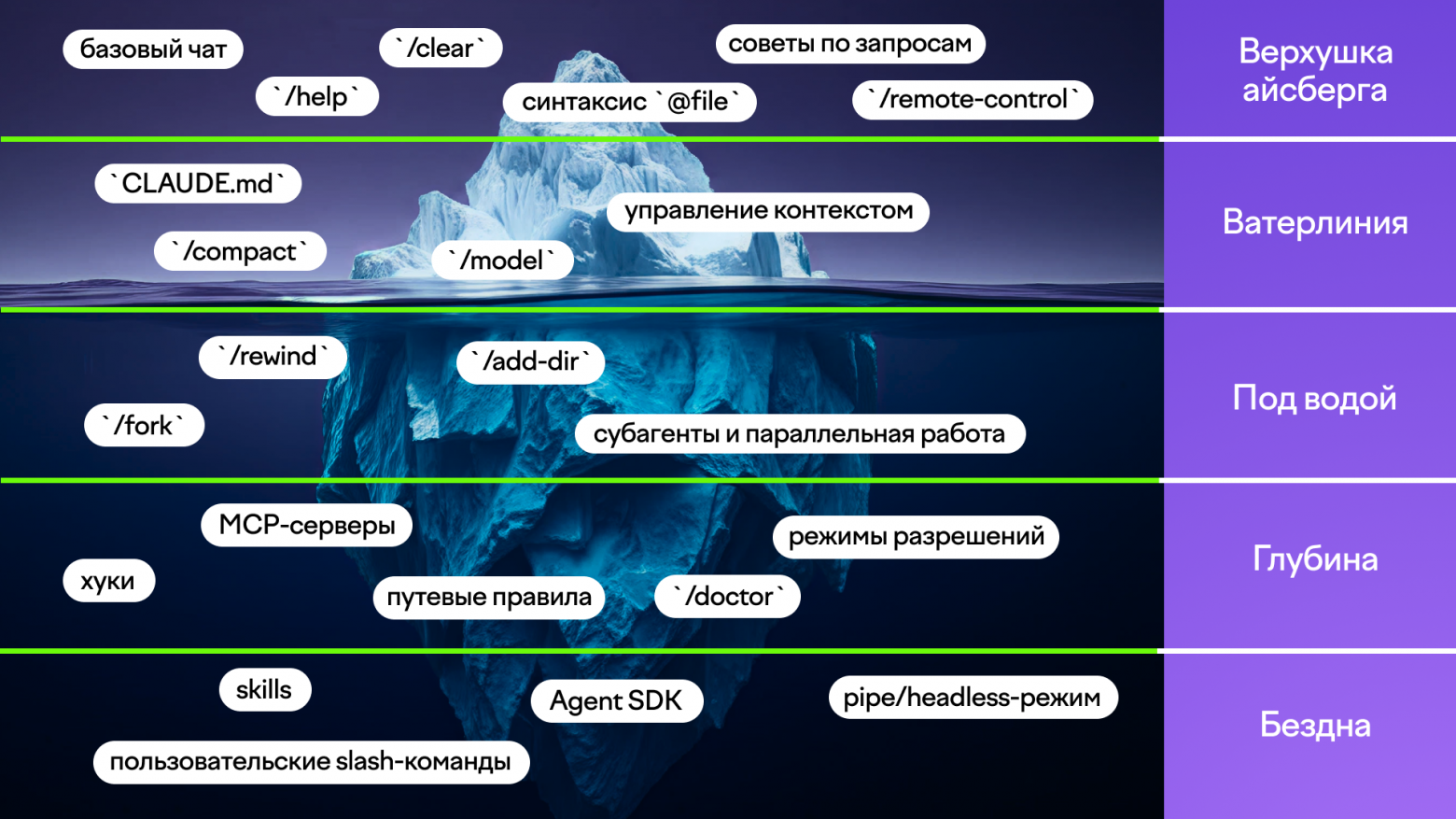
Level 1: The Tip of the Iceberg
These are basic Claude Code features that almost everyone starts with. If you've just installed the tool—start right here.1.1. Ask Questions and Generate Code
Claude Code works as a full-featured chat right in the terminal. You can ask it to explain code, generate new functionality, or rewrite existing code. Claude sees the entire project—you don't need to copy files to a browser. Extensions for popular IDEs are also actively appearing.Example requests:
- «Explain what the PaymentService class does»
- «Write a unit test for the calculateTotal method in OrderService»
1.2. The /help Command
Run it at least once. The command outputs a complete list of all slash commands with brief descriptions. It's the best reference if you're still figuring out what the tool can do.1.3. The /clear Command—Start Fresh
Every conversation accumulates history. When switching to a new task, old context can get in the way. The /clear command fully resets the history and frees up the context window.1.4. The @file Syntax
—explicit file specification
By default Claude sees the entire project, but sometimes gets confused with similar file names. The @file syntax explicitly loads the needed file into context.Example:Take a look at @src
/main/java/com/example/payment/PaymentService.java and find potential bugs
1.5. How to Formulate Requests Properly
The more precise the request—the better the result. Avoid vague formulations like «make it better.» Specify concrete changes, reasons, constraints, and examples of desired results.A good request:Rewrite the processPayment method in PaymentService: — use the Strategy pattern instead of if-else chains — extract each strategy into a separate class — add slf4j logging at INFO level when selecting a strategy
1.6. /remote-control (or /rc)—Manage from Your Phone
This command makes the current session accessible through the claude.ai web interface and mobile app. You can keep working from the terminal while observing and sending commands from your phone.
Level 2: The Waterline
Many people are familiar with these techniques, but not everyone uses them systematically. Mastering this level transforms Claude Code from «smart autocomplete» into a real partner.2.1. CLAUDE.md—Permanent Project Context
Create a CLAUDE.md file in the project root—this is how you give Claude information about your stack, conventions, architecture, and rules. It's automatically read at startup.There are three levels:
- global (~/.claude/CLAUDE.md)—your personal preferences,
- project (./CLAUDE.md)—team conventions,
- local (CLAUDE.local.md)—settings that don't go into git.
The /init command can generate a basic CLAUDE.md automatically.2.2. /compact—Manual Context Compression
In long sessions, the context fills up, and the model starts to «forget» important details. The /compact command lets you compress the history manually, specifying what to focus on.You can enable auto-compression: claude config set autoCompact true.2.3. /model—Switch Models on the Fly
Lets you switch between Haiku, Sonnet, and Opus right during a session. There's also an /model opusplan mode—Opus plans, Sonnet executes.2.4. Context Management—A Key Skill
Answer quality depends heavily on how much useful information and noise is in the context.Key rules:
- Pass only needed files via @file
- Use /clear when switching tasks
- After planning (Opus), hand off the ready plan to the executor (Sonnet) with a clean context
2.5. --continue and --resume—Working with Saved Sessions
Claude Code saves all sessions locally. --continue loads the last session in the current folder, --resume lets you pick any by name or ID.
Level 3: Underwater
This is where techniques start that clearly distinguish experienced Claude Code users from beginners. Each one really saves time on real tasks.3.1. Subagents and Parallel Work
One of the most powerful tools. Instead of making Claude process a large task sequentially, you can split it into parallel streams.Example: you need to conduct a security audit of 40 Java classes before release.
One agent would do it in about an hour. With subagents, Claude splits the files into 8 groups, runs 8 agents in parallel, and the main agent compiles the final report. Time is cut down to 10-12 minutes.Subagents are disposable—they perform one task and finish. You can chain them together and call one from another.Example prompt:I need to rewrite all tests from Kotlin to Java from the @src
/test/kotlin folder.
Use subagents: split the work by packages, each agent handles its own group.
3.2. Custom Sub-AgentsIn addition to built-in ones, you can create your own specialized agents.Example: a code review agent. Create a file .claude/agents/reviewer.md:
---
name: reviewer
description: Проводит код-ревью изменений
tools: Read, Glob, Grep
model: sonnet
maxTurns: 10
---

Ты — опытный ревьюер Java-кода. Проанализируй изменения и дай замечания только по:
- корректности логики
- обработке ошибок
- производительности
- соответствию принятым конвенциям

Не предлагай косметические правки. Фокусируйся на реальных проблемах.
After that, Claude will automatically delegate review tasks to this sub-agent when the context is appropriate.Ready-made sub-agents can be found in repositories: Awesome Claude Agents, wshobson/agents, and Subagents.cc.3.3. Ready-Made Commands, Agents, and SkillsDon't reinvent the wheel. Before writing your own agent or command, search for a ready-made solution in open catalogs. Often someone has already done exactly what you need.Good starting points are the same sub-agent repositories plus a regular GitHub search: "claude agents", "claude commands", "claude skills".3.4. /fork — Session BranchingA very useful command when you need to try several solution variants.Example: You've spent 20 messages debugging a complex bug. The context is already good. Now you want to test two different approaches to the fix. You simply run /fork via-chain, open a second terminal, and try an alternative approach there. Both Claude instances work with the same history, but in the same project directory.If you need full code isolation, use git worktrees.3.5. /rewind — Rolling Back Session and FilesThe /rewind command (or /checkpoint) allows you to return to any previous point in the session. Claude maintains a history of all changes made through its tools and can roll back both the conversation and files.This is much more convenient than git reset when experimenting within a single session.Important: only changes made through Claude are rolled back. Manual edits in the IDE or bash are not covered by /rewind.3.6. /add-dir — Working with Multiple DirectoriesBy default, Claude works only with the current folder. The /add-dir command lets you connect additional directories (for example, a shared library, a separate module, or even another repository).Useful when working with monorepos or when you need to edit the API contract and its implementation at the same time.
Level 4: Depths
At this level, Claude Code starts working as part of your team, not just a helper.4.1. Hooks — Automatic ActionsHooks allow you to run shell commands automatically when certain events occur (after writing a file, before a commit, etc.).The most useful scenarios:
- Auto-formatting code after each change (Prettier, Spotless, etc.)
- Running linter
- Preventing direct commits to master/main
- Auto-running tests after edits
Example of auto-formatting via Prettier:
{
  "hooks": {
    "PostToolUse": [
      {
        "matcher": "Write|Edit",
        "command": "npx prettier --write \"$CLAUDE_FILE_PATH\""
      }
    ]
  }
}
4.2. MCP Servers — Connecting External SystemsMCP (Model Context Protocol) is an open protocol that turns Claude Code into a real hub. Through it, you can connect Jira, Confluence, Bitbucket, Sentry, databases, and any other APIs.After connecting, you can write requests like:Find all Critical bugs in the PAYMENT project over the last week Take task PAYMENT-4521 and implement it according to its description
Claude will pull data from Jira, Sentry, etc. on its own.Especially convenient in combination with Sentry: "Check the latest errors in payment-service and suggest fixes".4.3. Path Rules (.claude/rules/)Allow you to set conventions tied to specific file types through glob patterns. Instructions are loaded into the context only when working with matching files — this saves tokens and makes rules targeted.Useful in large projects and monorepos where different modules follow different standards.4.4. Permission Modes and /permissionsClaude Code has a flexible permission system. You can switch between modes (default, plan, acceptEdits, bypassPermissions) and configure whitelists for actions.4.5. /doctor — TroubleshootingThe first command for any unclear errors. Checks the version, API connection, MCP server status, and access permissions.
Level 5: The Abyss
This is where the territory of serious automation, custom agents, and near-complete autonomy begins. Most developers don't even look here, but it's at this level that Claude Code transforms from a convenient helper into a real element of the engineering process.5.1. Custom Slash CommandsThe simplest way to standardize repetitive actions in a team.You create a file in .claude/commands/, commit it to git — and now the entire team can use the same command.Example: pre-release checkFile .claude/commands/deploy-check.md:
Выполни предрелизную проверку:

1. Запусти `./gradlew build` и убедись, что сборка проходит успешно
2. Проверь все тесты: `./gradlew test`
3. Убедись, что нет незакоммиченных изменений (`git status`)
4. Проверь, что текущая ветка — не master/main
5. Выведи сводку: статус сборки, количество пройденных тестов, текущая ветка

Если есть проблемы — дай чёткий список рекомендаций по исправлению.
Now you just need to write /deploy-check — and you get a unified report.For commands with parameters, use the $ARGUMENTS placeholder:Example: File .claude/commands/explain-class.md
Найди класс $ARGUMENTS в проекте и подробно объясни:
- его назначение и роль в архитектуре
- основные зависимости и кто его использует
- потенциальные проблемы и технический долг

Результат оформи в структурированном виде.
5.2. Skills — Reusable Prompt TemplatesSkills are the next level after custom commands. They are designed to be embedded in agent scenarios, can be called programmatically, passed between agents, and chained together.The topic is quite extensive and deserves a separate article, but the main point is that such a mechanism exists and greatly simplifies the reuse of complex prompts within a team.5.3. Claude Agent SDKFor those who want to embed Claude Code capabilities into their own tools, there is an official Claude Agent SDK (available in Python and TypeScript).With it, you can programmatically create agents, manage their lifecycle, connect tools, and process results.Typical scenarios:
- Automatic code review with custom logic
- Intelligent error analysis in CI/CD
- Internal chat bots for developers with access to the codebase
- Automatic security and code style auditors
5.4. Pipe Mode and Headless Mode — Claude Code in Scripts and CI/CDClaude Code can be used not only interactively, but also in automations.
- Pipe input — passing data through stdin
cat PaymentService.java | claude "find concurrency access issues" - Print mode (-p) — non-interactive output
claude -p "explain the processRefund method" - Structured JSON output — ideal for CI/CD integration and parsing with jq.
Example of automatic PR review: bash
git diff origin/master...HEAD | claude -p \
  "Проведи код-ревью этого diff. Укажи баги, проблемы безопасности и нарушения конвенций. Формат: markdown." \
  --output-format json > review-result.json
Example of generating a PR description: bash
claude -p "на основе git log и diff сгенерируй описание PR в формате markdown" > pr-description.md
Summary
Most developers stop at levels 1–2 and use Claude Code as advanced autocomplete. Real value starts at level 3 and fully unfolds at levels 4–5 — when the tool stops working alongside you and becomes part of your workflow. Claude Code is not just another AI in the terminal. When used properly, it becomes a true team member who can plan, delegate, follow your rules, and work 24/7. Which level became an eye-opener for you?
Which techniques do you use regularly, and which ones did you try for the first time after reading this article?
Share your thoughts in the comments — I'm curious to see which patterns have already taken hold in real teams.
A channel with guides and content about Claude Code — we share news (when limits get cut 10x) and tools we build with Claude for projects, channel: https://t.me/claudedevolper