I opened a new Claude Code session in a project I hadn't touched for two weeks. I asked "how's the client, what stage is the work at?" Claude answered with details I definitely didn't give him in this session. The name of the ssh-host where the dev environment lives. The deadline for acceptance. The folder for tasks in my Projects.
A channel with guides and content about Claude Code, we post news (when limits get slashed 10x) and what tools we implement through Claude for projects, channel: https://t.me/claudedevolper
I look at the response and think: I never told him that. At least not today.
I dug into what I have stored in ~/.claude/. Found a folder memory/ with sixteen markdown files. Opened it, and it had everything about me: context on clients, my tone preferences, server rules, failure stories. Everything Claude heard at some point and decided was worth remembering.
Well.
After an hour of digging, I figured out: Claude Code has not one but five different memory mechanisms. I was using one. I didn't manage two at all. I could have disabled one and didn't know. One you should set up manually if you're building anything serious.
Now about each of the five. Where to put what, where not to put it, and where I already stepped on a rake.
First, how Claude actually "remembers"
In short, here's what goes to the API with each request:
- System instructions (from you or from Anthropic)
- Contents of
CLAUDE.md, if it exists - Current conversation history
- What Claude read from files and tools in this session
All this gets compressed into one big prompt. Sonnet 4.6 has a 200K token window. Opus 4.7 in 1M mode already has a million. But cheap tokens are cache_read, and the cache breaks as soon as content changes at the start of the prompt. So saving on memory isn't about "not storing" but "put it where it won't break the cache".
The key thing: Claude Code doesn't remember in the human sense. Each time it reinserts into the prompt what it considers relevant. What's interesting is: who decides that and how.
Let's go through the levels, from simple to complex.
Level 1. CLAUDE.md, or what Claude always sees
The oldest and most predictable mechanism. You put a CLAUDE.md file in the project root, and its contents automatically get attached to every prompt in that project.
In one of my projects, CLAUDE.md looks like this:
## СтекNext.js 15, Postgres 16, Tailwind, shadcn/ui## Запуск- pnpm dev: локально- pnpm test: Vitest## НЕ трогать- /legacy: старый код, на него завязан скрипт миграции- migrations: только append-only, никогда не править существующиеОбъяснить с
Simple infrastructure text. About 2K tokens. Attached to every request.
An anti-pattern I've observed in others: stuffing all the architectural docs, testing instructions, feature histories into CLAUDE.md. That's 50K tokens loaded with every request. On a hundred requests a day, that's an extra five million tokens in the prompt we'd pay for.
Tip: keep CLAUDE.md under five thousand characters. If you want more, move it into separate .md files and let Claude read them on demand via Read.
Level 2. Auto-memory, or what Claude writes about you on its own
This is where the magic starts, the reason I got into this in the first place.
A folder ~/.claude/projects/{your-path-encoded}/memory/. Inside are markdown files and an index MEMORY.md. When I ask a question in a new session, Claude reads the index, decides which files are relevant to the topic, and loads them into context. Files Claude itself wrote earlier.
Sixteen files. Organized by type:
user: something about me (role, preferences, expertise)feedback: rules for working with me (what not to do, what to do)project: current projects and their contextreference: where things are (Linear, Slack, Yandex.Disk)
What gets added automatically, without my involvement:
feedback, when I say "don't do that again"project, when I tell about a new clientreference, when I give an external linkuser, when I say something characteristic about myself
What I can add manually: either by prompting "remember I work in UTC+3", or just editing the markdown file directly.
Where this has already saved me time:
- In a new session two weeks later, I ask "how's client X doing?" Claude answers on point: where the dev environment is, what user to log in as, what folder has the tasks.
Where I stepped on rakes:
Once it recorded my irritated "don't touch that at all" into feedback, but I meant a specific file, not the subsystem. Then for two weeks it didn't touch that subsystem, and I didn't understand why. I opened the memory, found the outdated rule, deleted it.
It recorded too general a rule about code style. As a result, it reformatted code in places where that style was inappropriate. I opened it again and rewrote it.
The main lesson: the memory lives on its own. Once every week or two, it's worth checking the folder to see what Claude wrote down about itself. Half of it will be irrelevant or outdated, a quarter still relevant, a quarter truly useful (especially about clients and our people).
And an ethical point: the AI keeps a dossier on me. Text-based, local, human-readable. It's convenient, but I wouldn't hand something like that to the cloud without checking.
Level 3. Auto-compact, or what happens when a session gets long
This mechanism broke my sessions about five times before I understood what it even was.
Scenario. You're in one session for an hour or two, actively writing code. At some point Claude starts answering shorter than usual, loses context from recent discussion, starts asking again about things it already knew. In the transcript you see a line "Compacted (ctrl+o to see full summary)".
That's auto-compact. When the context approaches the window limit, Claude Code re-compresses the earlier part of the conversation into a brief summary. Instead of fifty thousand tokens of history, you get five thousand tokens of retelling. The session continues, but details are lost.
What gets lost:
- Exact numbers ("I had 14 files" becomes "several files")
- File names and variable names mentioned in passing
- Agreements like "let's keep this option just in case"
- The line of reasoning (conclusions remain, the "why" is lost)
What remains:
- Current task
- Last 3-5 messages in full
- List of files touched
What you can manage:
/compactmanually, before it compresses automatically. Then I have control, you might say "compress, but keep details about X"/clearto reset context completely. When I realize the task has changed--resumeon the next CLI run to return to the previous session with its history
My developed approach: if I feel the discussion is becoming complex and important, I run /compact myself, explicitly. After that, Claude remembers exactly what I asked it to remember, not what seemed important to the algorithm.
And the complete opposite strategy: if I get stuck debugging and Claude is spinning around the wrong hypothesis, I do /clear. A fresh context beats rich history.
Level 4. Subagents, or memory that sometimes shouldn't exist
A paradoxical point. Sometimes it's better not to accumulate context, but to reset it.
What subagents are. This is running a separate mini-session of Claude from the main one, via the Task tool. I tell the main one "launch an agent of type debugger, give it this task". A new session starts from scratch. It doesn't have my fifty thousand tokens of history, doesn't have my memory files, doesn't have CLAUDE.md (unless I passed it explicitly).
Why this is needed:
- Fresh look at the problem. The main Claude is already stuck on a hypothesis, the subagent looks fresh
- Parallel work. I launch three agents simultaneously: one checks tests, another looks for duplicates, the third writes documentation
- Protection of main context. If the task is to read ten large files and provide a summary, it's better to have an agent do it, and only the summary comes back to the main context
Real case. I was debugging a bug for two hours in one session. Claude and I went through a bunch of hypotheses, each logically following from the previous one. Dead end. I launched a subagent via Task with one simple prompt: "here's the code, here's the error, what's wrong". Without all our history. In four minutes, the answer: the problem is in the module initialization order.
I wouldn't have figured it out myself. I was trapped by two hours of my own reasoning.
Cost: each subagent starts from zero, re-reads the necessary files. That's plus five to twenty thousand tokens on startup. Don't launch a subagent for trivial tasks.
Level 5. External memory: hooks and MCP Memory
The most powerful and most risky level. Memory that lives outside Claude Code.
Hooks in settings.json. These are scripts that trigger on events: pre-tool-use, post-tool-use, session-end. I can write every Claude action to a log file, and then another session can read that log and understand what happened before.
Example of my hook:
{ "hooks": { "PostToolUse": [ { "matcher": "Edit|Write", "hooks": [ { "type": "command", "command": "echo \"$(date '+%F %T') $(jq -r .tool_input.file_path)\" >> ~/.claude/changes.log" } ] } ] }}Объяснить сSimple thing. Every time Claude edits a file, a line is appended to the log. After a week I have the entire edit history, sorted by time. You can feed it to a new session: "here's what I did last week, continue from here".
MCP Memory server. A separate process that runs in the system and stores facts in a knowledge graph. Claude accesses it through the standard MCP protocol. The key difference from auto-memory: the same MCP Memory is visible to all projects, all sessions. This is no longer "memory about this project," but a shared knowledge base.
What I upload there:
- Contacts and relationships (who manages whom, who's on which client)
- Long-term business facts
- Methodological things (checklists, templates)
What I don't upload:
- Any personal information
- Anything that shouldn't sit locally on a computer for a year
Security: both hooks and MCP Memory are code that runs automatically. If you write rm -rf in a hook, it executes. If MCP Memory with open access connects to the network, it's a potential leak. We test first on isolated projects.
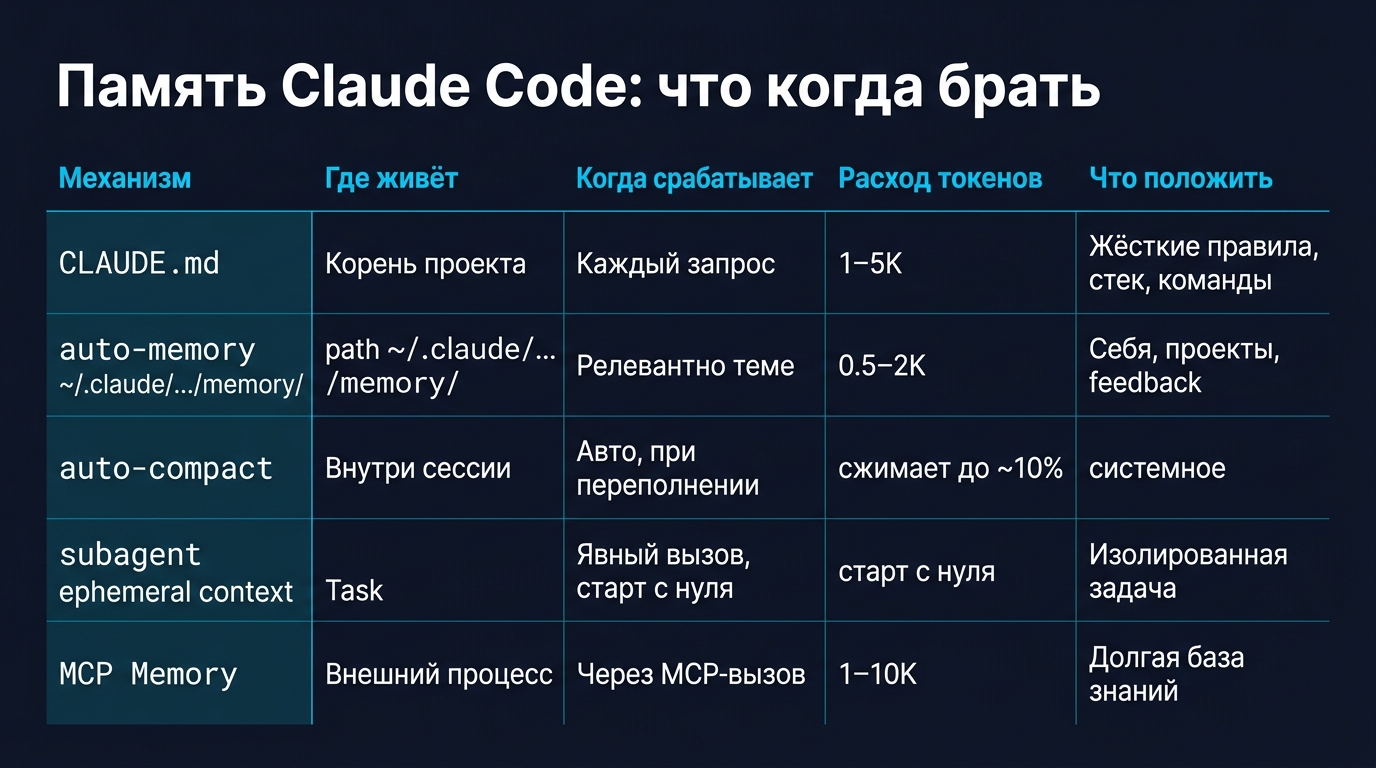
When to use what
The bottom line
Of the five mechanisms, auto-memory changes your life the most. This is the magic that makes it hard to go back to "AI that doesn't remember me." But magic has a price: attention. Clean it once a week, or Claude will follow outdated rules, and you won't immediately understand why.
CLAUDE.md and hooks. Old school, simple and predictable. They're underestimated, but wrongly so.
Auto-compact works on its own. The main thing is to know it's running and not be surprised when details from earlier messages vanish. Sometimes it's better to manually compress via /compact than to wait for the algorithm to do it.
Subagents save you when the main Claude gets stuck on a hypothesis. Not every session, but when the timing is right they save hours.
MCP Memory is only needed if you're building long-running agentic systems. For most people, it's overkill for now.
Now every Monday I go into ~/.claude/projects/.../memory/ and read what Claude knows about me. I delete half of it because it's redundant or outdated. I keep the other half—it's actually useful. When AI starts to remember, your relationship with it changes.
And now I understand that client better, the one who said a year ago: "I don't want an LLM with memory. I'm not ready for it to remember more than I do."
Channel with guides and Claude Code content, we post news (when they slash limits 10-fold) and what tools we build through Claude for projects, channel: https://t.me/claudedevolper