Picture a typical situation: you need to set up another stream data processor. You open documentation with 200+ pages describing dozens of source types, transformations, filters, and error handling policies. You search for the required parameters in sections on Kafka, RabbitMQ/ArtemisMQ, GRPC, PostgreSQL, and so on. You recall the syntax of the DSL — and it differs for different types of operations. You copy a similar configuration from a previous project found in your corporate Git repository and adjust it for new requirements. You switch between browser tabs with documentation and your IDE.
Channel with guides and content about claude code, we post news (when they cut limits tenfold) and what tools we implement through claude for projects, channel: https://t.me/claudedevolper
This takes anywhere from 30 minutes to several hours, and in the end, you can still make a syntax error, misconfigure a data source, or miss an important security parameter.
What if you could cut this process down to 30 seconds? Just describe the task in natural language — "Set up a processor to filter events from Kafka, keep only records with user_id greater than 1000 and priority high, send the results to a new topic" — and get a ready-made configuration adapted to the specifics of our product. Not an abstract YAML or CONF template that still needs adjustment for your product, but a configuration with the correct parameters, valid DSL syntax for transformations, and following the product's architectural patterns, ready for review and deployment in a production environment.
In this article, I'll explain how we built a system for automatic configuration generation for one of our product's components, using RAG (Retrieval-Augmented Generation), vector databases, and inter-agent communication over the A2A protocol.
A bit about the problem domain
Engineers working with stream data processing systems face the daily challenge of creating configurations for various systems. These include data processors, complex multi-step transformations, error handling policies, and event routing rules between services. Yet they must study voluminous documentation spanning hundreds of pages, where each system component is described in a separate section.
A developer must remember the syntax of many formats: YAML/JSON for base configurations, specific formats for describing security policies. But the hardest part is working with a proprietary DSL for describing data transformations. Creating a single medium-complexity configuration takes 30 minutes to several hours. In that time, the engineer switches between tasks, loses context, and gets distracted searching for information.
The classic approach — copy-pasting from previous projects with manual edits — is not only slow but error-prone. Every typo in a parameter name, wrong indentation in YAML, forgotten required parameter, or outdated syntax from an old configuration turns into lost debugging time. And if we're talking about a production environment, the cost of an error can be very high.
Moreover, documentation is constantly updated. New parameters appear, some become deprecated, recommendations change. An engineer may not be aware of recent changes and use outdated approaches. This problem is especially acute with proprietary DSLs: unlike standard formats like YAML or JSON, which have plenty of examples online, the specific syntax for transformations is documented only in corporate documentation.
Specifics of the transformation DSL
Platform V Synapse Streaming Event Processing uses a proprietary DSL for describing stream data transformations — tr-files. It's a declarative language specifically designed for clear transformation description without the need to write imperative code in Java or Python.
The DSL allows you to describe field mapping — transforming the structure of incoming events into the required output structure, with field renaming, extracting nested values from JSON, and merging multiple fields into one. Event filtering is implemented through expressions supporting complex conditions, logical operators, and functions for working with dates, strings, numbers, and regular expressions. There's data enrichment from external sources. The system supports aggregation windows, grouping by keys, and applying aggregating functions.
Here's an example of a simple transformation in this DSL:
define isFirst = truefor ($data: in) { if ($isFirst) { out[>] = $data headers[>].TargetKey = generateId() define isFirst = false } else { out[+>] = $data headers[+>].TargetKey = generateId() } INFO("RESULT", out, "TEST.OUT", "-")}For an LLM, this DSL is non-standard and wasn't in the training data of GigaChat or other public models. The model can't simply "remember" the syntax the way it could with Python or SQL. Attempting to generate a tr-file without additional context leads to hallucinations: the model might invent non-existent functions, use syntax from other similar languages, or mix up the order of sections.
That's why RAG becomes not just an improvement but a critically necessary system component. Without access to current documentation and examples, you can't correctly generate configurations in a proprietary DSL.
From idea to ready configuration in 30 seconds
We created a system that transforms a natural language description of requirements into a correct configuration in seconds. The key idea is to use the product documentation itself as a knowledge source for the AI, rather than trying to train a model from scratch on a specific DSL.
The process begins with a preparatory stage: loading all product documentation into a vector database. We take the official documentation in Markdown format, and a special service splits the documents into logical fragments (chunks) and converts them into vector representations — embeddings. This process only needs to be done once during initial system setup; afterward, the vector database is updated only when the documentation changes.
An engineer describes the configuration requirements in natural language, and the magic begins.
A request can be formulated simply and clearly: "Create a handler that reads events from the user-actions topic, filters only purchase-type events with amounts greater than 1000 rubles, enriches them with user data from an additional topic, and sends the result to the high-value-purchases topic". The system does not require knowledge of exact syntax or parameter names — it will find the necessary information in the documentation on its own.
The system analyzes the request and uses the RAG mechanism to find relevant context in the documentation. This is not a simple full-text keyword search, but a semantic search based on meaning. The system understands that "reads events from a topic" is related to the documentation section about Kafka sources, "filters only purchase-type events" requires filter configuration, and "sends the result to a topic" refers to destination setup.
The LLM receives the found documentation fragments and generates a ready-made configuration taking context into account. The model doesn't just generate text blindly — it relies on concrete examples from the documentation, uses correct parameter names, and adheres to syntax.
As a result, you get a configuration that can be applied immediately without additional refinement, all required parameters are filled with correct values, the product's configuration file structure requirements for the current version are met, and correct DSL syntax is applied for transformations (if needed).
This means that engineers don't need to spend time searching through product version documentation, remembering specific parameter names, or understanding DSL syntax nuances: the system does this automatically based on current documentation.
But generation is only half the battle.
During configuration creation, the generator agent calls the validator agent via the A2A protocol. The validator receives the generated configuration and the user's original request, then checks whether the configuration actually solves the stated task. Are all required parameters specified? Are there any logical errors or potential performance issues? The validator can respond "the configuration is correct" or request corrections: "the mandatory parameter field_name is missing in the filters section" or "for production environments, I recommend adding SSL connection".
The agents interact iteratively until a valid configuration is obtained. This may take several cycles: the generator creates the first version, the validator finds issues, the generator fixes them based on feedback, and the validator checks again. Usually one to three iterations are needed. This process is completely automatic and takes seconds, not hours of manual debugging.
After the configuration passes AI validation, it can be further checked with static methods. Config Validator verifies that YAML is syntactically correct, JSON schemas are valid, and if the configuration is intended for deployment in Kubernetes — checks compliance with the manifest specification.
You can set up custom checks using regular expressions: for example, ensure that topic names comply with the corporate naming convention. The finished result can be applied immediately to the cluster through the built-in deployment mechanism or copied and used in an existing CI/CD pipeline.
Vector databases: how AI understands documentation
Before moving to architecture, let's understand the foundation of the system — vector databases and the embeddings mechanism. This is the key technology that enables semantic search and contextual generation.
What is an embedding
An embedding is a way to represent text as a numerical vector of fixed length, typically between 384 and 1536 dimensions depending on the model.
Each number in this vector is a coordinate in multidimensional space, where the point's location reflects the semantic meaning of the text. The key feature of embeddings is that semantically similar texts have close vectors, and texts can be found by computing the distance or cosine similarity between vectors.
For example, consider three phrases from the documentation: "Kafka source" can be represented by the vector [0.82, -0.33, 0.15, 0.67, ...], "Kafka input" — by the vector [0.81, -0.35, 0.14, 0.65, ...], and "read from a message queue" — by [0.77, -0.33, 0.14, 0.63, ...].
All three phrases describe a similar concept of retrieving data from a message broker, and their vector representations will be close to each other in multidimensional space. The distance between the first and second vectors will be small, while between the first and a completely unrelated phrase like "network policy configuration" — much larger.
It's important to understand that embeddings don't simply count the number of shared words. The model that creates embeddings is trained on vast amounts of text and understands context, synonyms, and relationships between concepts. Therefore, "Kafka source" and "read from a topic" will have close embeddings even if they have no common words.
Documentation indexing
When a document is loaded into the system, several important processing steps occur.
First, the document is divided into semantic fragments — chunks. This is a critically important step because the quality of division directly affects search quality. Chunks that are too small lose context, while those that are too large become non-specific and may contain multiple unrelated topics.
We adjust chunk size depending on the documentation specifics. For reference documentation with short parameter descriptions, the optimal size is 256-512 tokens. We use overlap between chunks of 10-20% of the chunk size. This means the last few sentences of one chunk repeat at the beginning of the next. Why? To preserve context at boundaries. If a description of a concept falls on the boundary between chunks, overlap guarantees that in one of the chunks the description will be presented in full.
We convert each chunk into a vector using Sber's Embeddings model. We chose it because it is specifically trained on Russian and produces high-quality semantic representations of Russian-language technical texts. The model understands specific terminology, abbreviations, and technical jargon.
Vector representations are stored in Platform V Vector DB — a specialized vector database designed for high-performance semantic search. Along with vectors, we store the original text of the fragment and metadata: document source, section, update date, tags (for example, kafka, filters, security). This allows precise filtered search — for example, only for Kafka materials or only for security-related sections.
For example, a document with network policy configuration rules can be split like this: a chunk "Deny all inbound traffic by default" will get a vector [0.76, -0.21, 0.94, ...] and metadata {source: "network-policy.yaml", section: "ingress-rules", tags: ["security", "network"]}, and the next chunk "Allow port 80 only from frontend namespace" will get its own vector [0.68, -0.19, 0.91, ...] and similar metadata. When searching by the query "configure access to the service only for frontend" the system will find both of these chunks as relevant, with the second one scoring higher.
RAG: Retrieve-Augment-Generate
Let's figure out why simple LLM usage isn't enough for our task. Modern language models, such as GigaChat, GPT or Claude, have impressive capabilities for text generation and context understanding. But they have fundamental limitations.
First, the model may not know the specifics of your documentation. GigaChat is trained on public data from the internet, but our internal documentation on Platform V Synapse Streaming Event Processing, proprietary DSL, and corporate standards were not in the training dataset.
Second, the model's knowledge is limited by the training date. If the last training was six months ago, and during that time three product updates with new parameters were released, the model doesn't know about them.
Third, the model can "hallucinate": invent nonexistent parameters, mix syntax from different versions, generate plausible-sounding but incorrect configurations.
RAG (Retrieval-Augmented Generation) is an architectural pattern where the model does not rely solely on knowledge gained during training, but first gets current context from an external source — in our case from a vector database with documentation. This fundamentally changes the approach: the model becomes not a source of knowledge, but a documentation interpreter that can understand user requests and correctly apply information from found fragments.
Three Stages of RAG
Retrieve (Search). When a user enters a query, the system doesn't immediately send it to the LLM. First, the query is vectorized — converted to an embedding using the same Embeddings model that was used to index the documentation. This produces a query vector. Then the system searches the vector database for chunks with the most similar vectors, calculating cosine similarity between the query vector and the vectors of all chunks in the database.
This is semantic search: we search not by exact word matches, but by meaning. For example, a query "configure event filtering by timestamp field greater than yesterday's date" will find relevant fragments even if the documentation uses different phrasings like "temporal filtering", "time cutoff", "filter by time field" or examples with different field names. The model understands that all these phrases are semantically similar.
The system returns the top-K most relevant chunks, typically K=3-5. More isn't always better: too much context can confuse the model, increases tokens in the prompt (meaning cost and processing time), and may include less relevant information. We experimentally selected the optimal value for our system.
Augment (Enrichment). Found chunks are not simply concatenated; they are structured and formatted. A prompt is formed consisting of several sections. System_prompt sets the agent's role and rules of behavior, here is part of the system prompt:
You are a configuration file and DSL transformation generator for Cloud Event Processing, acting strictly according to the specification and provided context. Main requirements: Use only information from this prompt. Generate only syntactically and semantically valid configurations and DSL files according to the specification or provided context. All required fields must be filled. If a required field cannot be correctly filled — do not generate the file. Do not use constructs, blocks, parameters, functions, or syntax not described in the specification or provided context. Any deviation is an ERROR. Do not add explanations, descriptions, comments, or fictional elements in any of the files. If multiple files are needed (for example, config and transform), output each with the name and extension in a separate block. To improve generation quality, use the information provided in the context field. File name and extension — first line of the block. No duplicate names are allowed.
Context includes relevant fragments from the documentation, formatted in a special way. Each fragment is preceded by a header indicating the source: "From section 'Configuring Kafka Sources':", "Example from documentation:", "Best practice:". This helps the model understand where the information comes from and how it should be interpreted. If code examples are found, they are included in full with comments.
User_request is the user's original request, possibly slightly rephrased for clarity. For example, if a user wrote "make a handler like last time, but for a different topic", the system might ask for clarification.
Generate (Generation). The fully formed prompt is sent to GigaChat. An important nuance: we use specific generation parameters. Temperature is set to a relatively low value around 0.5, which makes generation more deterministic and predictable, which is critical for code and configuration generation. High temperature (0.8-1.0) is good for creative tasks, but in our case it could lead to "creative interpretations" of syntax.
The LLM generates a response based on both its basic knowledge of YAML/JSON formats and general configuration principles, and on the provided context from the documentation. This ensures that the configuration will correspond to the current product specification, use correct parameter names, comply with the API version, and follow best corporate practices.
Microservice Architecture of the Solution
The system is built as a set of independent microservices, which provides flexibility, scalability, and the ability to update individual components without stopping the entire system.
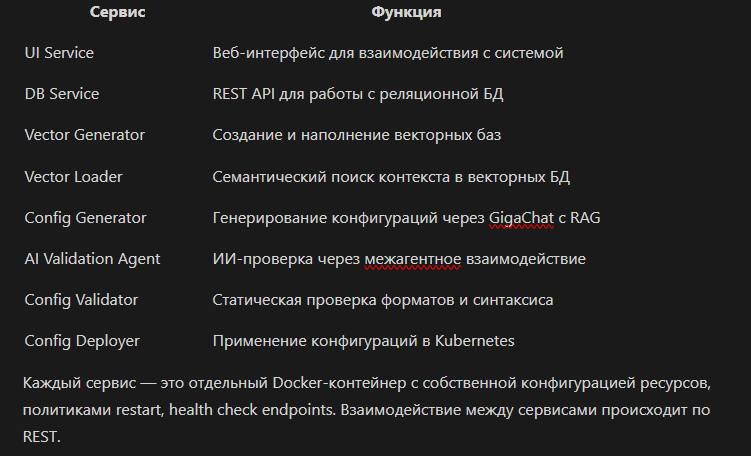
Each service is a separate Docker container with its own resource configuration, restart policies, and health check endpoints. Interaction between services occurs via REST.
UI Service
This is a single entry point for engineers. The functionality includes managing the complete configuration workflow. This is just one implementation option; the system is designed so that other services can be accessed directly via REST API, integrating them into existing CI/CD processes.
For example, you can set up a Jenkins pipeline that calls the Config Generator API to automatically generate configurations based on parameters from a Git repository, validates the result through Config Validator, and applies it through Config Deployer. The interface is a presentation layer for interactive work, but it's not a necessary component.
DB Service
This is the central metadata repository for the system and a REST API for working with the database. The database stores system prompts for various configuration types. Each configuration type has its own optimized prompt with instructions for the model, examples of the desired output format, and a list of required and optional parameters.
Validation rules are stored in a structured format: regular expressions for pattern validation of names, ranges for numeric parameters, lists of allowed values for enumeration fields. Deployment templates are Jinja2 templates for Kubernetes manifests with placeholders for substituting generated configurations.
Vector database metadata includes the database name, description, creation date, number of chunks, embeddings model used, chunking parameters (size, overlap), status (active/inactive), and tags for filtering.
The generation history is fully logged: request timestamp, user_id, request text, configuration type, vector databases used, found context, generated configuration, validation results, deployment status (if applied). This data is invaluable for analyzing system quality and improvements.
Vector Generator
This is an ETL pipeline for documentation. It is responsible for creating and populating vector knowledge bases, transforming unstructured texts into vector representations that can be searched (searchable embeddings).
The process starts with creating vector databases: initializing a new database (collection) in Platform V Vector DB with specified parameters. Then comes document processing: loading files of various formats with automatic format detection and parsing.
Next comes chunking, with chunk size individually configured for each vector database—256 or 512 tokens. Overlap is also configurable: typically 10-20% of chunk size, but for technical documentation with many cross-referenced examples, it can be increased to 30%. After this, embeddings are generated.
Metadata synchronization is the final stage, where information about the vector database is registered in DB Service for further use by other components. Vector Generator can also incrementally update existing databases: add new documents, update changed ones (by content hash), delete outdated ones. This allows keeping vector databases up-to-date without full reindexing.
Vector Loader
A key component for implementing RAG, a bridge between user requests and documentation. This service can process multiple concurrent requests in parallel.
The work starts by requesting active vector databases from DB Service. You can filter which databases to use for a specific configuration type—for example, when generating a Kafka source, search only in databases tagged 'kafka' and 'sources', ignoring irrelevant databases.
Context formation consists of the top-5 chunks by similarity score with the original request.
The result is an ordered list of chunks with metadata, ready for substitution into the prompt.
Config Generator
The heart of the system, the orchestrator of the entire generation process. This is an asynchronous service for working with the GigaChat API. When it receives a request from a user (through the interface or directly via API), a workflow is launched. First, Vector Loader is automatically called to get relevant context—this is a synchronous call, and Config Generator waits for the result. Then the system prompt is loaded from DB Service, specific to the configuration type being generated.
A complete request is formed, combining the system prompt, context, and user request. Order is important here: first the system prompt establishes the role and rules, then the context provides knowledge, and only then the user request specifies the specific task. This helps the model correctly prioritize information.
The request is sent to GigaChat with the generation parameters configured.
After receiving the generated configuration, Config Generator doesn't immediately return it to the user. Instead, validation is automatically started. In this process, Config Generator acts as a coordinator in a multi-agent system, maintaining interaction via the A2A protocol to coordinate with the AI Validation Agent. This is an asynchronous process with a callback: Config Generator sends the configuration for validation and subscribes to notifications about the result.
AI Validation Agent
This is the second AI agent in the system, specializing in validation. An important aspect: it's a separate service with its own prompt and model, not part of Config Generator. Why? Because generation and validation tasks require different approaches, different prompts, and different model parameters.
The agent receives a validation request via the A2A protocol, containing the generated configuration, the original user request, and context from the documentation (the same chunks used during generation). This is critical: the validator must see the same context to assess correctness relative to current documentation, not abstract notions of 'correctness'.
Several types of analysis are performed. Correctness analysis checks whether the configuration actually solves the given task—if the user asked to 'filter by user_id > 1000', is there a corresponding filter in the configuration? Are the parameters specified correctly? Completeness analysis ensures that all required parameters are specified: for each configuration type, there's a schema with required fields, and the validator checks against it.
Style analysis checks compliance with best practices and company standards—for example, whether recommended default values are used, whether all necessary fields required for security are set, whether logging is enabled. This is a straightforward check: a configuration can be technically correct but still not meet company standards. The validator flags this as a warning, not an error.
Security analysis—one of the most important—identifies potential issues: whether TLS is used for data transmission, whether there are hardcoded secrets in the configuration. The validator is trained to recognize patterns of insecure configurations.
The agent returns a structured response: overall verdict (valid, invalid, warning), confidence score (how confident the agent is in the assessment, from 0 to 100), list of issues (each with priority indication: error, warning, info, location in configuration, issue description) and general recommendations for improvement. If errors are found, the Config Generator can automatically request regeneration by including in the prompt a description of the issues found ("in the previous version there was error X, fix it").
Config Validator
This is a defense layer against syntax errors and schema violations that works in parallel with the AI Validation Agent. A classic validator without AI, but no less important.
YAML/JSON format checking uses yamllint and built-in Python parsers with detailed error messages—not just "invalid YAML", but "line 15, column 3: expected indentation of 2 spaces but found 4". Kubernetes manifest checking verifies compliance with the Kubernetes API specification: whether apiVersion is specified correctly, whether such a kind exists, whether all necessary fields (required fields) are present in metadata/spec.
Regex checking for specific patterns: you can set rules like "topic names must match the pattern ^[a-z0-9-]+$", "ports must be in the range 1024-65535", "namespace cannot be 'default' for production". Dry-run in Kubernetes—a final check before actual application: we send the manifest to the Kubernetes API with the dryRun=true flag, and the API verifies correctness without actually creating resources.
The results of all checks are combined into a single report with categorization by remark types and recommendations for fixes.
Config Deployer
The final link in the chain, responsible for safe deployment of configurations in Kubernetes.
The system supports two operating modes. In direct manifest generation mode, the model immediately creates a ready-to-use Kubernetes manifest with complete specifications for Deployment, Service, ConfigMap and all necessary fields. This is faster, but less flexible. In templating mode, pre-prepared manifest templates with corporate standards are used: labels for monitoring, annotations for service mesh, imagePullSecrets, resource requests/limits, liveness/readiness probes. The LLM generates only the business logic of the configuration (for example, application settings), which is substituted into the template.
The second approach guarantees consistent deployments, compliance with corporate policies, integration with existing infrastructure. At the heart of the template creation mechanism is Jinja2 with custom filters and functions for handling specific cases.
Full system operation cycle
Let's trace a detailed path from request to applied configuration using a real example.
A user—engineer Alexey—receives a task: set up an event filter handler from a Kafka source, keep only events from users with user_id greater than 1000 and priority high, send the result to a new topic for further processing. Previously, Alexey would open the documentation, find examples of Kafka source configuration, then the section on filters and destination, and assemble it all together.
Now Alexey simply opens the interface of our system, selects the Cloud Event Processing configuration type, enters in the text field: "Set up an event filter handler from Kafka source topic user-events, keep only events with user_id > 1000 and priority == 'high', send the result to the high-priority-users topic". Clicks "Start generation".
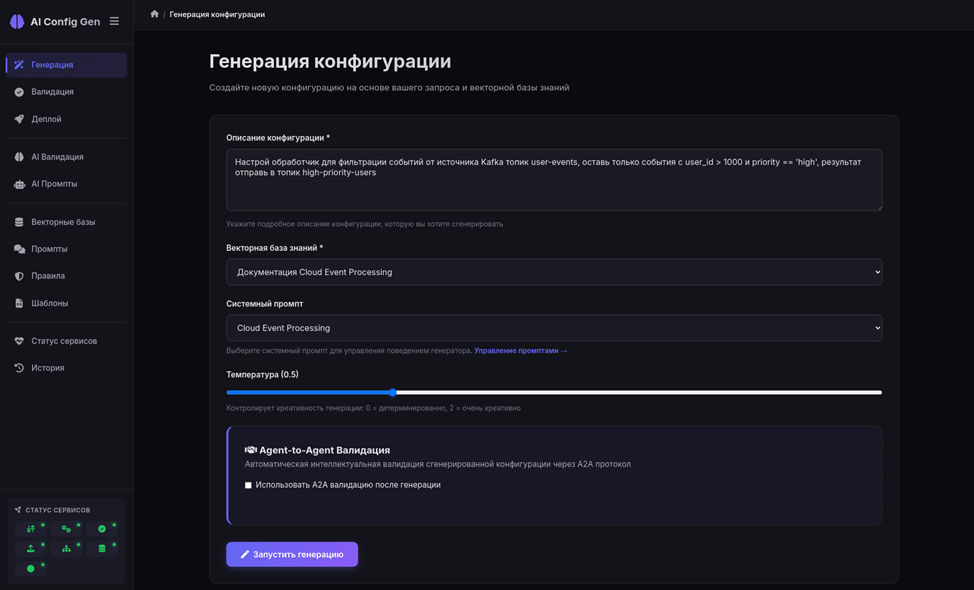
Vector Loader receives the request, vectorizes it via Embeddings, searches in vector databases. Finds top-5 chunks: "Kafka source configuration with example of specifying bootstrap servers and topic", "Filter expression syntax for numeric fields", "Filter expression syntax for string fields and enum values", "Example of combining multiple filters", "Configuration of destination for writing to Kafka topic". These chunks are returned to Config Generator with similarity coefficients of 0.89, 0.87, 0.85, 0.82, 0.79 respectively.
Config Generator receives the system prompt from DB Service, which contains the instruction: "Generate configuration in CONF format. Structure: source, aggregationStep, transformStep, destination. Use exact syntax from examples. Don't make up non-existent parameters". Combines the prompt, context, and user request, forming a complete prompt.
Sends to GigaChat API with carefully selected generation parameters. Temperature=0.5, we discussed earlier why this specific value was chosen. However, we pass the model another parameter—max_tokens with a value of 1500, which limits the response length. For medium-complexity configurations, this is sufficient: a typical Cloud Event Processing configuration takes about 300 tokens. The reserve is needed for comments and possible explanations from the model. Too small a limit (500-800) will cut off complex configurations in the middle, too large (3000+) will allow the model to generate excessive content: additional examples, explanations, alternative options that will complicate result parsing.
Config Generator automatically sends this configuration to AI Validation Agent via the A2A protocol. The validator analyzes it in the context of the original request and found documentation. Checks: is there a filter for user_id > 1000? Yes. For priority == 'high'? Yes. Is the destination specified for the correct topic? Yes. Are all required fields present? Checks source (type, config.bootstrap_servers and config.topic are present), transformStep (structure is correct), destination (type and config are present)—everything is in place.
The validator notes that a placeholder ${KAFKA_BOOTSTRAP} is used instead of a fixed address—this complies with company standards, marking it as a positive. Checks security: are there no credentials in plain text? No. Is group_id used to avoid duplicate processing? Yes. The confidence score is calculated as 0.94 (very confident).
The validator returns a verdict: {status: "valid", confidence: 0.94, issues: [], recommendations: ["Consider adding error handling policy for failure messages"]}.
Config Generator receives a positive verdict, launches Config Validator for static checking. Validator checks the generated CONF file using static validation against the schema.
In the interface, Alexey sees the generated configuration with a green checkmark "Validated" and recommendations as information tips. The configuration looks correct. Alexey clicks "Deploy configuration to namespace".
Config Deployer receives a request, loads a Kubernetes manifest template for the Cloud Event Processing component from DB Service, substitutes the generated configuration into the template for deployment. Performs a dry-run through the Kubernetes API. The API returns success — the manifest is correct and will be accepted. Deployer applies the configuration. Kubernetes creates a resource, a Pod with the Cloud Event Processing component starts. Config Deployer monitors the state: waits for the Pod to transition to Running state, checks the readiness probe. After 15 seconds, the Pod is ready, health check is green. Deployer saves a record in DB Service: applied successfully, timestamp, user: Alexey, namespace: dev, and also the ready manifest.
In the interface, Alexey sees "Deployed successfully to dev namespace", a green indicator, a link to the Pod in the Kubernetes dashboard. From request to working configuration in the cluster took 30 seconds. Alexey smiles and looks at the monitor.
How the system works with proprietary DSL
Let's return to the question of working with tr-files — a proprietary DSL for transformations that we mentioned at the beginning of the article. The technical implementation of vectorizing DSL examples has its own peculiarities.
In the vector database, we store not just documentation text, but specially structured examples: complete working tr-files, divided into semantic blocks with annotations (say, "example of aggregation with time window"), comments explaining non-obvious constructs, and typical usage patterns with variations. Each example is vectorized as a whole, without splitting into small chunks — this is critical for maintaining syntactic integrity of the code.
When a user requests transformation generation, Vector Loader finds several most relevant tr-file examples by semantic similarity of the task. The LLM receives complete examples in the prompt and uses them as templates, adapting the syntax to the specific request. This is a few-shot learning technique in the context of RAG: the model learns from examples during execution, without retraining.
As a result, we achieve high accuracy in generating tr-files for a proprietary language that is not in the model's training data.
Security and Privacy
Working with corporate documentation and production configurations imposes strict security requirements. All documentation is stored in a private vector database within the company's perimeter, not somewhere in the cloud. We don't send confidential data to external APIs. AI Validation Agent is also trained to find potential leaks of confidential data in configurations and mark them as security issues.
Conclusions
We created an end-to-end solution for automatic generation of stream data processing configurations, which reduces configuration creation time from hours to seconds, and through automatic checks excludes copy-paste errors and typos. Automatically applies best practices from documentation through RAG, provides two-level checking — static and intelligent AI checking, supports inter-agent interaction via standard A2A protocol for extensibility.
RAG proved to be an ideal solution for generating configurations in proprietary DSL. It allows the model to work with current and specific documentation that is not in the training data, reduces the risk of hallucinations by relying on real examples from documentation, is easily updated — you just need to upload a new version of the documentation to the vector database without retraining the model. Scales to any type of configuration and DSL, it's a universal approach.
Key project technologies: RAG for generation contextualization, vector databases Platform V Vector DB for semantic search by meaning, Embeddings for creating high-quality embeddings of Russian-language technical texts, GigaChat as the main LLM for generation and checking, A2A protocol for inter-agent interaction and extensibility, microservices architecture for flexibility and scalability.
Channel with guides and content on claude code, we post news (when limits get slashed by 10x) and what tools we implement through claude for projects, channel: https://t.me/claudedevolper