Late last year I discovered n8n. I wrote four bots for personal tasks, published an article on Habr, and was already making plans for a cloudless future in the world of automation. But the idyll didn't last long. OpenClaw appeared — a project that was dubbed the "AI-agent killer." And then I had doubts: wasn't it time to throw away the old work and migrate to a new stack? I dove into studying, figured things out, and made a decision: I'm staying on n8n. OpenClaw for creating personal AI agents turned out to be too complex, expensive, and unjustified a solution. But let's go in order — from theory to practice.
A channel with guides and content on Claude Code, where we post news (when they cut limits by 10x) and what tools we implement through Claude for projects, channel: https://t.me/claudedevolper
Why does OpenClaw spend tokens so quickly?
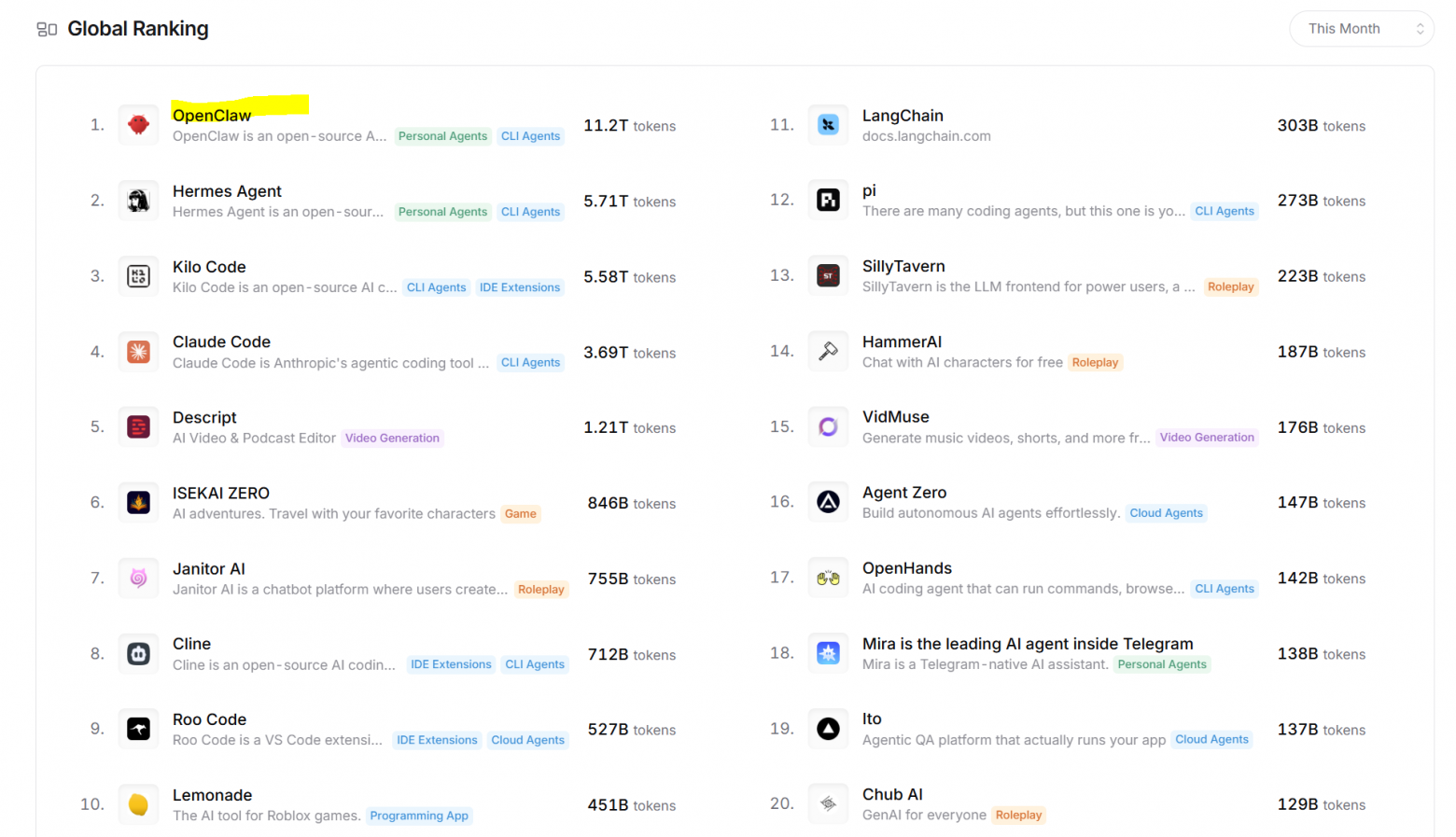
Token consumer — this is not hype, but dry statistics. Here is data on token consumption by applications through OpenRouter:
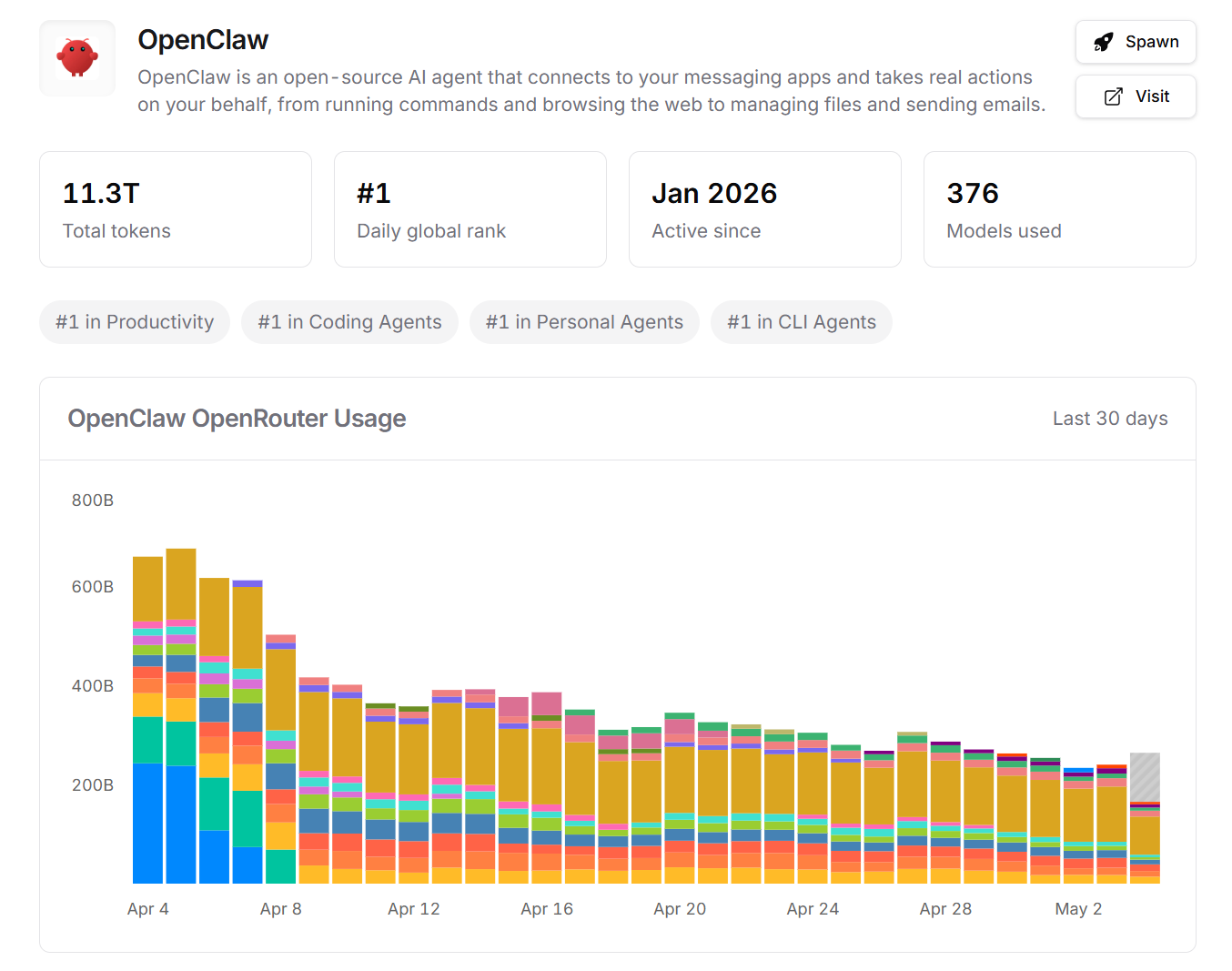
OpenClaw is currently in first place, but the following chart shows that token consumption by the application is decreasing. This means that either interest has started to decline, or people have learned how to optimize token consumption:
Use cases for OpenClaw
The most popular use case for OpenClaw is a morning briefing. The concept is simple: every morning you get a selection of news on your chosen topic, tasks from your calendar, notifications about important emails, and so on. Here's what my briefing looks like:
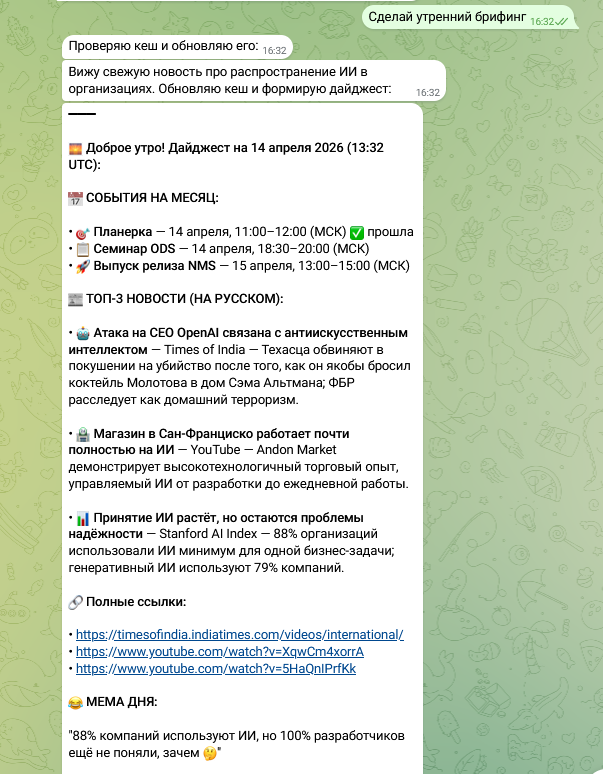
I included in my briefing:
- Calendar data — I connected a test Google Calendar with tasks for the month.
- AI news — through search tools (Web or Tavily) the system finds three most important global news and translates them into Russian.
- Meme of the day — for mood at the end the agent tries to find a meme about artificial intelligence.
Other use cases suggested by the community:
- Incoming task dispatcher — incoming messages from Telegram can be processed on the fly: written to documents, create tasks, add events to calendar, send reminders.
- Smart email sorting — the agent receives emails, analyzes them and automatically generates a response (better as a draft so you can verify before sending).
- Transcription and voice commands — for example, making git commits via voice command.
- Support bot — receives reports from users and immediately makes fixes.
- Idea and code generator — a more complex use case: analyzes AI trends over the last day, generates an idea and immediately writes code.
- Search by personal information — OpenClaw positions itself as a personal assistant. It remembers all the information you share or exchange with it, and can search through it.
OpenClaw Architecture
You can read about the theory of AI agents in my article "Make a bot for work". OpenClaw is a classic AI agent, but with its own terminology.
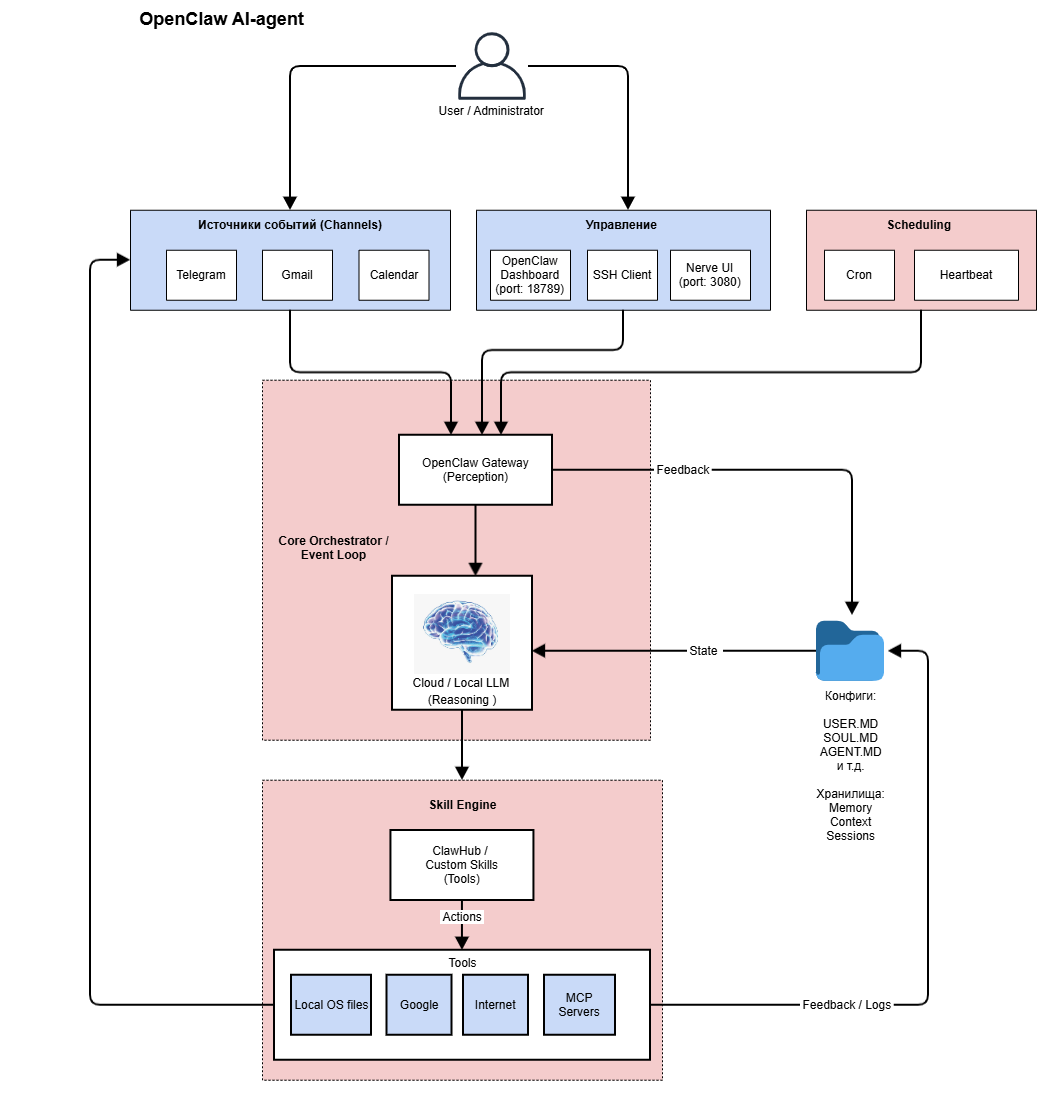
User / Administrator
The user (also the administrator) — configures and uses the agent.
Event sources
In OpenClaw, event sources are called Channels. These can be messengers, email, calendar, web interface. Events also come from Cron tasks and the Heartbeats module. Every 30 minutes the module checks if anything important happened and launches processing logic.
Management
Management and configuration is done through the OpenClaw web interface or third-party UIs (for example, Nerve UI). You can also do everything directly in local files or via SSH.
Perception
OpenClaw Gateway — the central node where data reception, normalization and orchestration occurs. The Gateway also implements authentication, rate limiting, event queue, context collection, session management.
Reasoning
LLM — the brain of the system and a mandatory component. OpenClaw doesn't work without a neural network. LLM can be cloud-based or local.
Action
Skill Engine — action execution, skill registry, synchronization with ClawHub. Skills can be standard (downloaded from OpenClaw Hub) or custom (created by the user themselves).
Tools — external integrations, MCP, clouds, third-party APIs, local application calls.
Memory
Serves to store context, sessions, logs. The default storage is the file system. Everything is written to files which are then passed to the LLM.
Work cycle
The results of action execution go back to the event sources, and the cycle repeats.
Practice
This section is written based on my seminar at ODS training "LLM: From Understanding to Product". Materials from the seminar "OpenClaw: Personal AI agent in practice — from installation to morning briefing":
- Full stream on YouTube or VK Video.
- Notes on GitHub.
In the article I will provide an abbreviated version of the seminar to make it clear that even basic actions in OpenClaw turn into a non-trivial quest.
Prerequisites for installing OpenClaw
- Get API Keys:
- For Telegram in BotFather
- For Google API
- For web search (Tavily)
- Choose an LLM with paid or free subscription, or deploy a local model. AI sources:
- Huggingface: https://huggingface.co/
- Openrouter: https://openrouter.ai/
- Choose where to install OpenClaw:
- On your laptop in the main OS or in a separate VM (for example, using VirtualBox). In any case there will be restrictions on security and 24/7 operation.
- Second option — buy a cloud VPS (Virtual Private Server). Minimum configuration: 2 CPU cores, 4 GB RAM, 40 GB HDD.
Step-by-step guide to installing OpenClaw on clean Ubuntu
Here's a list of steps without details to understand the scope of the challenge. Detailed instructions can be found in many places, for example, the following were useful for me:
- Selectel: OpenClaw: installation and first impressions
- Video overview of installation and use cases from official OpenClaw documentation:
- ClawdBot (OpenClaw): The self‑hosted AI that Siri should have been (Full setup)
- OpenClaw (Clawdbot) use cases: 9 automations + 4 wild builds that actually work
Basic Ubuntu Setup
- Update the system.
- Create a separate openclaw user (never use root).
- Configure the firewall (local or cloud) to open only the required ports.
- Configure SSH access via keys, disable password login.
Installing OpenClaw
- Switch to the openclaw user.
- Install the Homebrew package manager to install skills. Then use:
- Standard apt to install system dependencies and the system core.
- Homebrew for user applications and utilities that aren't in official repositories.
- Install Node.js 22+.
- Install OpenClaw, use the recommended script or npm.
- Run the OpenClaw setup wizard:
- Enter the API key of the chosen AI provider.
- Configure communication channels (Telegram).
- Set up systemd service for OpenClaw auto-start.
- Configure Skills (can be done later): Gmail, calendar, web search.
After Installing OpenClaw
- Install Nerve if you need to manage multiple agents.
- Pair devices: Telegram bot and the installed OpenClaw instance.
- Port forward ports 18789 and 3080 for UI (port forwarding).
- Run the OpenClaw UI and enter the Gateway token from openclaw.json.
Running OpenClaw UI
Local only, do not expose to the internet:
- OpenClaw dashboard: http://localhost:18789/
- Nerve dashboard: http://localhost:3080/
Configuration
Configuring Agent Personality
On first agent launch (BOOTSTRAP), the following files are populated:
- IDENTITY.md — agent name, style, emoji, avatar.
- USER.md — user information: how to address them, timezone.
- SOUL.md — agent information: boundaries, communication tone.
- AGENTS.md — agent operation rules.
After this, OpenClaw becomes your personal agent that knows itself and you and knows how to work.
Configuring Heartbeat
Heartbeats and Cron Jobs: How Not to Bankrupt Yourself on Tokens
This was an interesting surprise for me. I woke up in the morning — OpenClaw wasn't working. I went to OpenRouter and checked: the limit had run out. Overnight it had spent $5... Five dollars overnight!
Why Did This Happen?
By default, OpenClaw uses the most advanced and expensive model — Opus 4. Each request can cost 10 cents. Heartbeats check the system every 30 minutes, and if the model is expensive, the bill skyrockets. But if you disable heartbeats, you lose automatic recovery after errors and retry attempts.
What to Do?
- Cron jobs as an alternative — I set up a morning briefing via cron job (once every 24 hours). It's less reliable: if something goes wrong, there won't be a retry. But tokens aren't wasted every half hour on idle checks.
- Switch to a cheaper model — for example, I switched to Claude Haiku. Savings — about 80%.
- Always set limits with your LLM provider — you can't give the agent unlimited credit. Never.
How to Disable Heartbeats
View the last heartbeat:
openclaw system heartbeat last
Disable temporarily:
openclaw system heartbeat disable
Disable permanently: configure Heartbeat in the file ~/.openclaw/openclaw.json
"heartbeat": { "every": "0m", "target": "none" }After saving the file, verify config validity:
python3 -m json.tool ~/.openclaw/openclaw.json > /dev/null && echo "JSON OK"
Restart OpenClaw Gateway:
openclaw gateway restart
Check logs — there should be no new 'heartbeat' entries:
openclaw logs 2>&1 | grep -i heartbeat | tail -10
Wait another ~35 minutes and confirm there are no new runs.
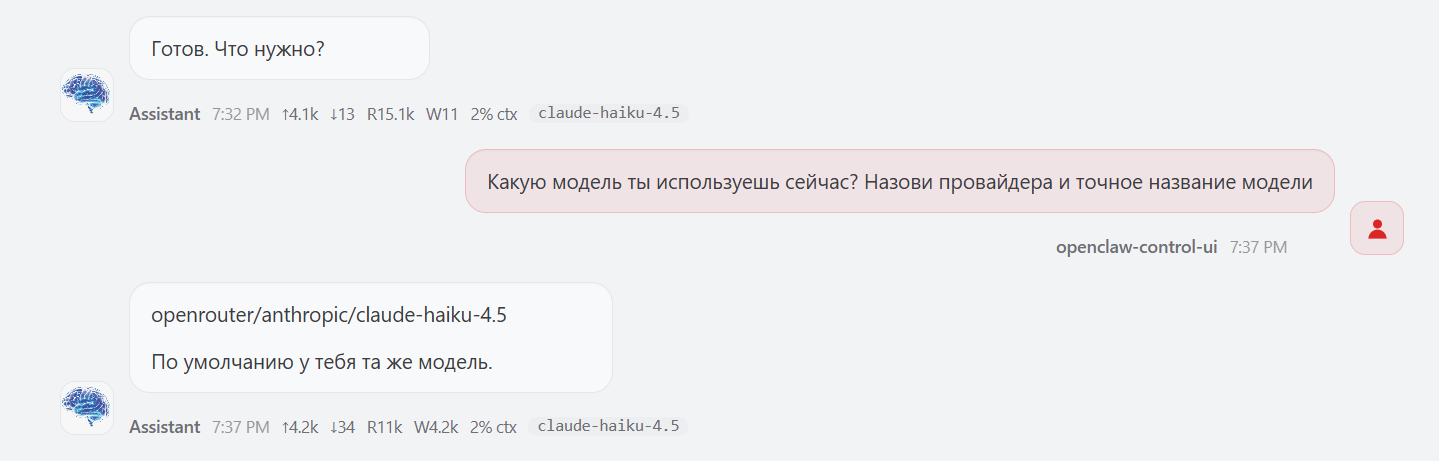
Setting Up an Avatar
Seems like a simple action. But it also requires understanding and strict sequence of steps. Important clarification: the avatar is the avatar of the OpenClaw agent itself, not yours (the user's).
Upload a PNG file with a blue brain to the directory:
~/.openclaw/workspace/avatars
- Edit IDENTITY.MD
- Restart OpenClaw Gateway
- Run the chat, see the agent has a new avatar:
Changing the LLM Model
For optimizing token costs, this is the most important step. The model is set in the file:
~/.openclaw/openclaw.json
Edit the file. Was:
"model": { "primary": "openrouter/auto"},"models": { "openrouter/auto": { "alias": "OpenRouter" }}Now (example with Haiku 4.5):
"model": { "primary": "openrouter/anthropic/claude-haiku-4.5"},"models": { "openrouter/anthropic/claude-haiku-4.5": { "alias": "Haiku 4.5" }}You can add a fallback model so the system doesn't break if the primary model is unavailable:
"model": { "primary": "openrouter/anthropic/claude-haiku-4.5", "fallbacks": [ "openrouter/google/gemini-2.0-flash", "openrouter/deepseek/deepseek-chat" ]},"models": { "openrouter/anthropic/claude-haiku-4.5": { "alias": "Haiku 4.5" }, "openrouter/google/gemini-2.0-flash": { "alias": "Gemini Flash" }, "openrouter/deepseek/deepseek-chat": { "alias": "DeepSeek" }}After saving the file, check the syntax:
python3 -m json.tool ~/.openclaw/openclaw.json > /dev/null && echo "✓ JSON OK"
And restart Gateway:
openclaw gateway restart
To verify the new model works, there are two ways:
- Ask a direct question "Which model are you using right now? Name the provider and exact model name."
- Send a test request:
openclaw "Какая сегодня дата? Ответь кратко."
And check logs — there should be an entry with the new model. It's also worth checking expenses in your AI provider's dashboard. For OpenRouter — the Activity section.
Setting Up Skills
Installing the Standard gog Skill
This skill is used for working with Gmail, Google Calendar, Drive, Contacts, Sheets, Docs. Below is a list of steps to understand the scope of work. Installation:
brew install steipete/tap/gogcliОбъяснить с
Generating client_secret.json
This file needs to be generated manually in Google Cloud Console specifically for gog.
- Go to Google Cloud Console and authorize with your Google account.
- Open the Google Cloud Console page and create a new project.
- Enable the necessary APIs. Minimum set for gog:
- Gmail API
- Google Calendar API
- Google Drive API
- People API (for contacts)
- Create credentials (OAuth Client ID):
- In the side menu, go to the API section, then Services / Credentials
- Click the "Create Credentials" button and select "OAuth client ID".
- In the opened form:
- Application type: Select "Desktop application". This is important because gog runs on your computer.
- Name: Enter any understandable name, for example, Gog CLI on my Ubuntu.
- The remaining fields can be left empty.
- Click the "Create" button.
- Download the credentials file:
- Immediately after creation, a pop-up window will appear with your Client ID and Client Secret.
- Click the blue "Download JSON" button.
- This downloaded file is your client_secret.json. It will have a name like client_secret_your-id.apps.googleusercontent.com.json. For simplicity, you can rename it to client_secret.json.
Where to put client_secret.json
- Recommended option — save the file to the configuration folder ~/.config/gogcli/
- For gog to recognize the file in the future without specifying a path, it should be renamed to credentials.json
How to use with gog
Now you can pass it to the gog auth credentials command. You can use an absolute or relative path to the file.
gog auth credentials ~/.config/gogcli/credentials.json
Configuring gog in OpenClaw
- After successfully executing the previous command, you can add your account. Additionally, you need to add the "-manual" parameter
gog auth add Alexey.P.Sushkov@gmail.com --services gmail,calendar,drive,contacts,sheets,docs --manual
- You can check that everything went successfully with the command:
gog auth list
- You should see your email in the list of authorized accounts.
- Checking the calendar:
gog calendar events e5b2dxxxxxxxxxxxxxxxxxxxxxxxxxxxxx4c690f@group.calendar.google.com --from 2026-04-01 --to 2026-04-30
- Since we work on a VPS and execute commands from scripts, it's better to switch to file-based storage. This completely eliminates the need for passwords and is safer than keeping a password in plain text in ~/.bashrc.
- After switching to file-based storage, the gog calendar events command will work without environment variables and without prompting for a password.
- When working further, keep in mind that it is not possible to selectively revoke access for one API while leaving another within a single OAuth 2.0 Client ID. Revoking a token always revokes all permissions granted by the user for this Client ID.
Custom skill
There are two ways to create a custom skill:
- Simple — give an explicit command in the chat, for example: Please create a summarize skill for me via ClawHub.
- Complex — struggle manually through files.
Security
Final recommendations for securely configuring OpenClaw:
- Infrastructure and Network:
- Separate user
- Disable unused ports.
- SSH only via keys.
- Authentication and Access Control:
- Access to admin panels only via localhost.
- Principle of least privilege: each skill receives only the necessary scopes.
- Secrets and Configuration
- Passwords / API tokens are not stored in configs, but in .env or password managers, secure storage.
- Protecting yourself from AI-agents:
- Token and call limits are necessary:
- max retries: 3
- timeout: 10 min
- Implement explicit confirmation for destructive actions (deletion, mass mailing).
- Check the code of skills from ClawHub before installation — cases of malicious packages have been documented.
- Logging, Monitoring, and Response:
- Implement centralized log collection.
- Exclude confidential and personal information from logs.
- Check Dashboards every evening: latency, token cost, tool success rate, error rate, queue depth and the like
List of Useful Commands
Version should be higher than v2026.3.24+
openclaw --version
Gateway reload, the most used command:
openclaw gateway restart
Check config validity:
python3 -m json.tool ~/.openclaw/openclaw.json > /dev/null && echo "JSON OK"
Security Audit
openclaw security audit
openclaw security audit --deep
Apply auto-fixes (carefully!)
openclaw security audit --fix
Practice Summary
- OpenClaw is running and accessible via localhost.
- Channels are connected (Telegram + Gmail / Calendar).
- Skill installed from ClawHub (gog, tavily) + custom skill written (AI memes, summarize)
- The agent reads calendar events, searches for news, generates a joke, and sends a message to Telegram.
My Expenses
- Server in Selectel in minimum configuration — about 2000 ₽/month.
- Tokens (OpenRouter) — about 1–2 dollars per day (morning briefing + experiments).
- Total — about 3000 ₽/month for a morning briefing. Seems like a lot, honestly. For that money, I could find the news myself!
Comparing n8n with OpenClaw
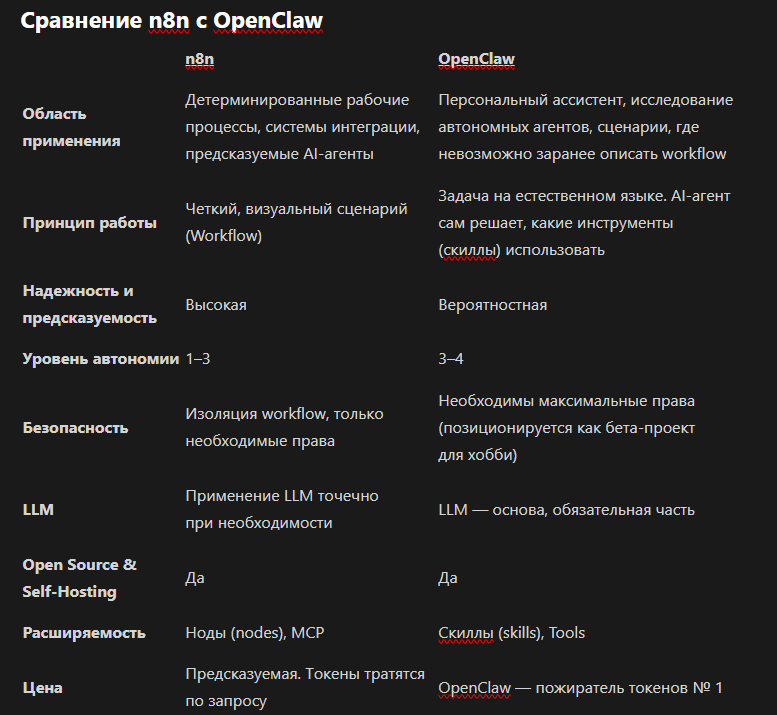
OpenClaw — the #1 token consumer
Conclusion from the table
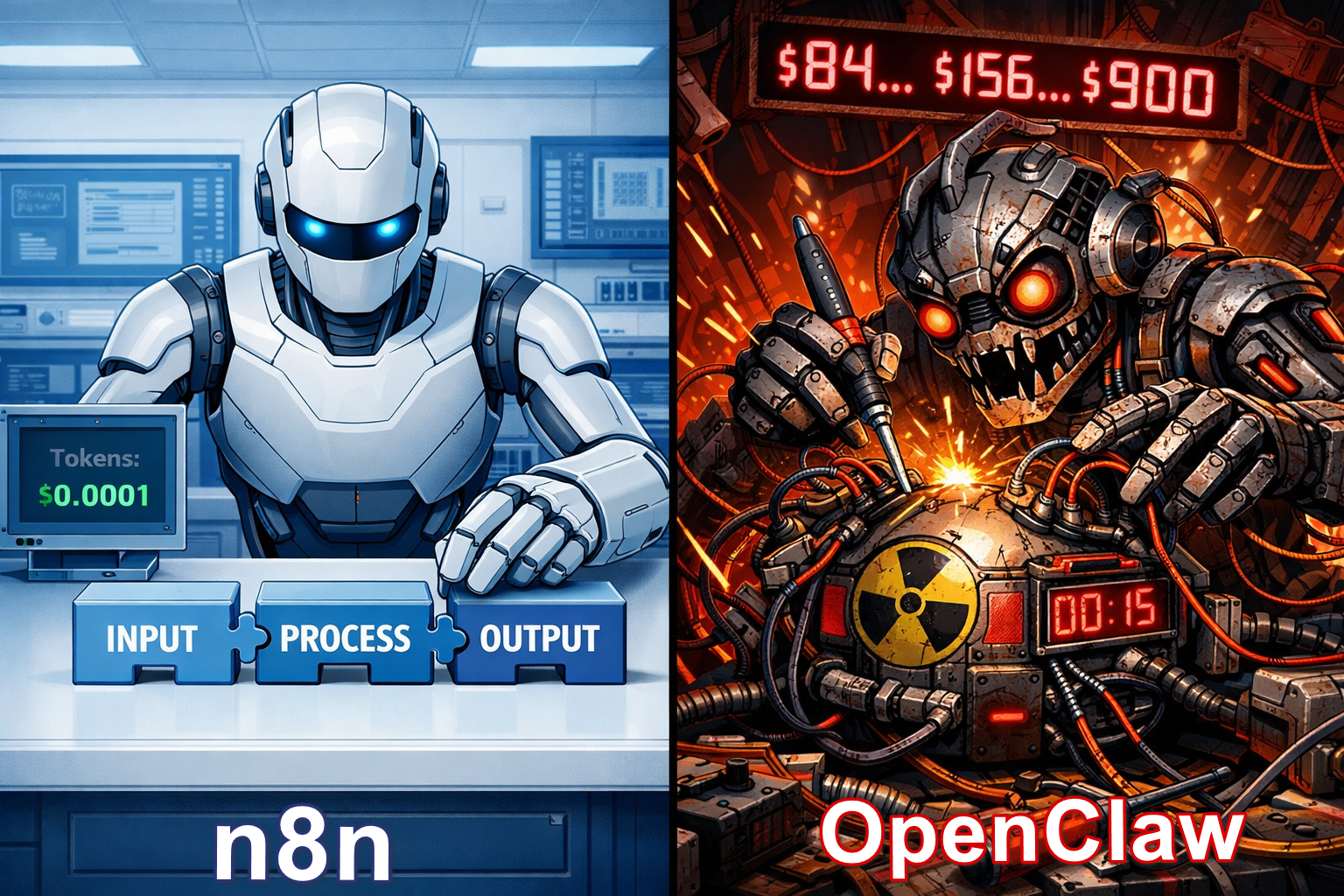
n8n is about control. OpenClaw is about delegating to chaos.
Conclusion
OpenClaw turned out to be not a "killer," but rather a demonstration of where AI-agents are developing: towards autonomy, universality, and maximum flexibility. But along with that come side effects: complexity, lack of transparency, high costs, and serious infrastructure requirements. And if your task is to solve specific business or personal tasks with predictable results, controlled costs, and minimal risk, then n8n looks much more rational!
A channel with guides and content on Claude Code, where we share news (when limits get cut) and showcase what tools we're building for projects through Claude, channel: https://t.me/claudedevolper